This example shows how to create and destroy a file on a SD card. Please click here for more information on the SD library.
Source: Arduino – Files
 Jovan Stosic
This example shows how to create and destroy a file on a SD card. Please click here for more information on the SD library.
Source: Arduino – Files
Jovan Stosic
Jovan Stosic
IntroductionOTA (Over the Air) update is the process of loading the firmware to ESP module using Wi-Fi connection rather that a serial port. Such functionality became extremely useful in case of limited or no physical access to the module.OTA may be done using:Arduino IDEWeb BrowserHTTP ServerArduino IDE option is intended primarily for software development phase. The two other options would be more useful after deployment, to provide module with application updates manually with a web browser or automatically using a http server.In any case first firmware upload have to be done over a serial port. If OTA routines are correctly implemented in a sketch, then all subsequent uploads may be done over the air.There is no imposed security on OTA process from being hacked. It is up to developer to ensure that updates are allowed only from legitimate / trusted source. Once update is complete, module restarts and new code is executed. Developer should ensure that application running on module is shut down and restarted in a safe manner. Chapters below provide additional information regarding security and safety of OTA process.
Jovan Stosic
Jovan Stosic
Jovan Stosic
Christoph Willibald (Ritter von) Gluck (German: [ˈkʁɪstɔf ˈvɪlɪbalt ˈɡlʊk]; 2 July 1714 – 15 November 1787) was a composer of Italian and French opera in the early classical period. Born in the Upper Palatinate (now part of Germany) and raised in Bohemia,[1] he gained prominence at the Habsburg court at Vienna, where he brought about the practical reform of opera’s dramaturgical practices that many intellectuals had been campaigning for over the years. With a series of radical new works in the 1760s, among them Orfeo ed Euridice and Alceste, he broke the stranglehold that Metastasian opera seria had enjoyed for much of the century.
Jovan Stosic
Jovan Stosic
Jovan Stosic
Jovan Stosic
Jovan Stosic
Jovan Stosic
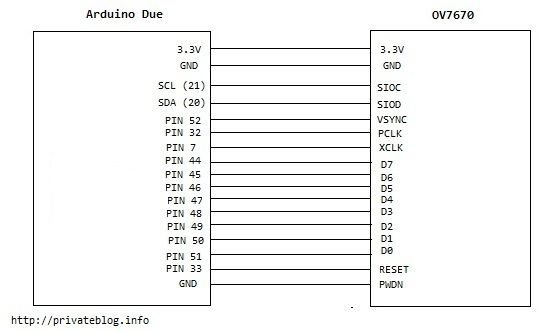
This instruction is a quick translation for an instruction in Russian available at
http://privateblog.info/arduino-due-i-kamera-ov7670-primer-ispolzovaniya/
Connection of OV7670 to Arduino Due is easier than to Arduino Uno: lower operation voltage – only 3V, higher internal speed, more memory and more contacts on the board.
Source: How to Connect OV7670 to Arduino Due: 6 Steps (with Pictures)