Robot_Control\ArduinoRobot.cpp errors
Robot_Control\ArduinoRobot.cpp errors
 Jovan Stosic
Jovan Stosic
Jovan Stosic
Robot_Control\ArduinoRobot.cpp errors
Jovan Stosic
WordPress is the most popular content management system on the web. In this guide, we’ll demonstrate how to install and configure it on an Ubuntu 14.04 server.
Source: How To Install WordPress on Ubuntu 14.04 | DigitalOcean
Jovan Stosic
I am connected using SSH to a Ubuntu Box which is behind firewall and routers. From that Ubuntu box i need to open a router web page and login to the router for doing some changes.How can i from
Source: networking – Command line web browser using SSH, is there any way i can use – Ask Ubuntu
Jovan Stosic
rc-switch – Arduino lib to operate 433/315Mhz devices like power outlet sockets.
Source: GitHub – sui77/rc-switch: Arduino lib to operate 433/315Mhz devices like power outlet sockets.
Jovan Stosic
Source: Arduino Playground – Email
Jovan Stosic
Jovan Stosic
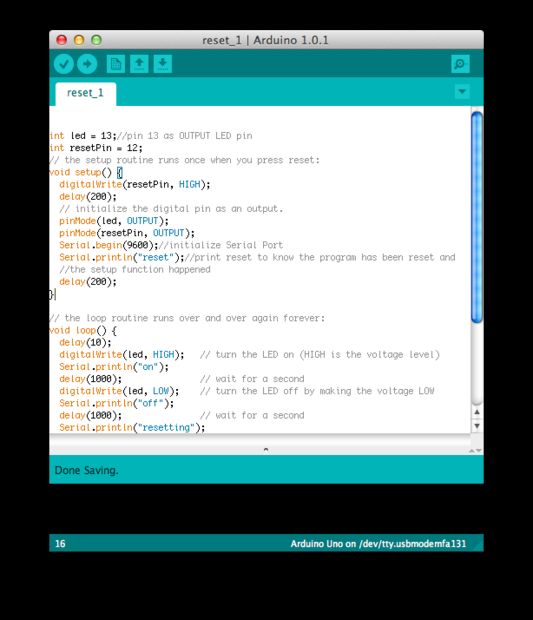
If you want to RESET Arduino from the beginning without manually pressing the RESET button, there are a few ways. Here are two ways, using minimal wiring / circuitry.
Jovan Stosic
This tutorial explains how to setup mail server on ubuntu 14.04 using postfix,dovecot and squirrelmail.
» Postfix ( for sending )
» Dovecot ( for receiving )
» Squirrelmail ( for webmail access ).
Here i have used mail.krizna.com for hostname and krizna.com for Domain . please replace with your domain
Source: Setup mail server on ubuntu 14.04 ( Postfix – dovecot )
Jovan Stosic
Source: ZTE ZXV10-H201L [OpenWrt Wiki]
Jovan Stosic
Generate any number of random MAC addresses with multiple options.
Jovan Stosic
One of the most common steps to take when setting up a new server is to install a LAMP stack. LAMP stands for Linux, Apache, MySQL, and PHP. These individual components, when used together, allow us to host dynamic web content like websites and web ap
Source: How To Install Linux, Apache, MySQL, PHP (LAMP) stack on Ubuntu 14.04 | DigitalOcean
Jovan Stosic
(PHP 7)
random_bytes — Generates cryptographically secure pseudo-random bytes
Description 
string random_bytes ( int$length)Generates an arbitrary length string of cryptographic random bytes that are suitable for cryptographic use, such as when generating salts, keys or initialization vectors.
The sources of randomness used for this function are as follows:
- On Windows, » CryptGenRandom() will always be used.
- On Linux, the » getrandom(2) syscall will be used if available.
- On other platforms, /dev/urandom will be used.
- If none of the aforementioned sources are available, then an Exception will be thrown.
Source: PHP: random_bytes – Manual