Engineering and technology

Ship gun fire-control system – Wikipedia

Ship gun fire-control systems (GFCS) are fire-control systems to enable remote and automatic targeting of guns against surface ships, aircraft, and shore targets, with either optical or radar sighting.

Most US ships that are destroyers or larger (but not destroyer escorts or escort carriers) employed GFCS for 5 -inch and larger guns, up to battleships, such as the USS Iowa. Beginning with ships built in the 1960s, GFCSs were integrated with missile fire-control systems and other ship sensors.

The major components of a GFCS are a manned director, with or replaced by radar or television camera, a computer, stabilizing device or gyro, and equipment in a plotting room[1]

For the USN, the most prevalent gunnery computer was the Ford Mark 1, later the Mark 1A Fire Control Computer, which was an electro-mechanical analog ballistic computer that provided accurate firing solutions and could automatically control one or more gun mounts against stationary or moving targets on the surface or in the air. This gave American forces a technological advantage in World War II against the Japanese who did not develop Remote Power Control for their guns; both the USN and IJN used visual correction of shots using shell splashes or air bursts, while the USN augmented visual spotting with Radar. Digital computers would not be adopted for this purpose by the US until the mid-1970s; however, it must be emphasized that all analog anti-aircraft fire control systems had severe limitations, and even the USN Mk 37 system required nearly 1000 rounds of 5″ mechanical fuze ammunition per kill, even in late 1944.[2]

The MK 37 Gun Fire Control System incorporated the Mk 1 computer, the Mk 37 director, a gyroscopic stable element along with automatic gun control, and was the first USN dual purpose GFCS to separate the computer from the director.

Source: Ship gun fire-control system – Wikipedia

Adobe AIR – Wikipedia

Adobe AIR (formerly Adobe Integrated Runtime) is a cross-platform runtime system developed by Adobe Systems for building desktop applications and mobile applications, programmed using Adobe Flash, ActionScript and optionally Apache Flex. The runtime supports installable applications on Windows, OS X and mobile operating systems including Android, iOS and BlackBerry Tablet OS. It also originally ran on Linux, but support was discontinued as of version 2.6 in 2011.

Source: Adobe AIR – Wikipedia

Model–view–controller – Wikipedia

Model–view–controller (MVC) is an architectural pattern commonly used for developing user interfaces that divides an application into three interconnected parts. This is done to separate internal representations of information from the ways information is presented to and accepted from the user. The MVC design pattern decouples these major components allowing for efficient code reuse and parallel development.

Traditionally used for desktop graphical user interfaces (GUIs), this architecture has become popular for designing web applications and even mobile, desktop and other clients. Popular programming languages like Java, C#, Ruby, PHP and others have popular MVC frameworks that are currently being used in web application development straight out of the box.

Source: Model–view–controller – Wikipedia

Node.js – Wikipedia

Node.js is an open-source, cross-platform JavaScript run-time environment for executing JavaScript code server-side. Historically, JavaScript was used primarily for client-side scripting, in which scripts written in JavaScript are embedded in a webpage’s HTML, to be run client-side by a JavaScript engine in the user’s web browser. Node.js enables JavaScript to be used for server-side scripting, and runs scripts server-side to produce dynamic web page content before the page is sent to the user’s web browser. Consequently, Node.js has become one of the foundational elements of the “JavaScript everywhere” paradigm,[5] allowing web application development to unify around a single programming language, rather than rely on a different language for writing server side scripts.

Though .js is the conventional filename extension for JavaScript code, the name “Node.js” does not refer to a particular file in this context and is merely the name of the product. Node.js has an event-driven architecture capable of asynchronous I/O. These design choices aim to optimize throughput and scalability in Web applications with many input/output operations, as well as for real-time Web applications (e.g., real-time communication programs and browser games).[6]

The Node.js distributed development project, governed by the Node.js Foundation,[7] is facilitated by the Linux Foundation’s Collaborative Projects program.[8]

Corporate users of Node.js software include GoDaddy,[9] Groupon,[10] IBM,[11] LinkedIn,[12][13] Microsoft,[14][15] Netflix,[16] PayPal,[17][18] Rakuten, SAP, Tuenti,[19] Voxer,[20] Walmart,[21] and Yahoo!.[22]

Source: Node.js – Wikipedia

MongoDB – Wikipedia

MongoDB is a free and open-source cross-platform document-oriented database program. Classified as a NoSQL database program, MongoDB uses JSON-like documents with schemas. MongoDB is developed by MongoDB Inc., and is published under a combination of the GNU Affero General Public License and the Apache License.

Source: MongoDB – Wikipedia

Sencha Touch

Sencha Touch is a user interface (UI) JavaScript library, or web framework, specifically built for the Mobile Web. It can be used by Web developers to develop user interfaces for mobile web applications that look and feel like native applications on supported mobile devices. It is based on web standards such as HTML5, CSS3 and JavaScript. The goal of Sencha Touch is to facilitate quick and easy development of HTML5 based mobile apps which run on Android, iOS, Windows, Tizen and BlackBerry devices, simultaneously allowing a native look and feel to the apps.

Source: Sencha Touch – Wikipedia

delayMicroseconds() – crash · Issue #2240 · esp8266/Arduino · GitHub

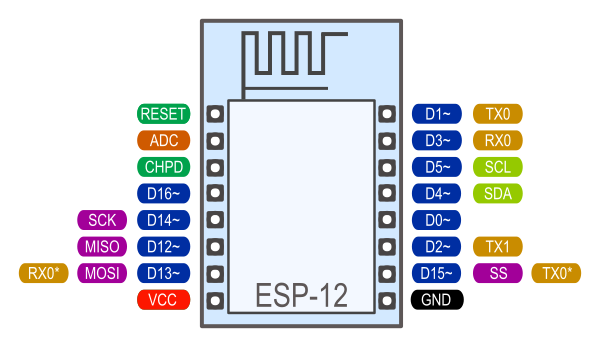
ESP12F

I’m working on a PWM Routine (not finished still in progress) which did crash for some reason (code#1)


reason is that your whole routine is fully blocking for the cpu and it takes more than the watch dog permits (thus triggering soft wdt reset). The reason why it does not crash when you add delay() is that delay() actually switches the context back to the system while you are delaying and feeding the watchdog this way.

void delayMicroseconds(uint32_t us){
  uint32_t start = micros();
  while(micros() - start < us){}
}

void delay(uint32_t ms){
  uint32_t start = millis();
  while(millis() - start < ms){
    yield();//give the system a chance to execute
  }
}


Source: delayMicroseconds() – crash · Issue #2240 · esp8266/Arduino · GitHub