Engineering and technology

apt – Can’t install xdebug – Depends: phpapi-20121212 – ubuntu 14.04 – Ask Ubuntu

You’re using manually installed PHP packages that don’t stem from the official repositories. Anything could happen in that case and I suggest that you report the issue to their maintainer.

Solution 1: Switch/downgrade to in-repository packages

The immediate solution is to revert to the in-repository packages with:

sudo apt install php5=5.5.9+dfsg-1ubuntu4.20 php5-xdebug=2.2.3-2build1

If you have other packages depending on that php5version you’ll need to install their respective in-repository versions in the same fashion.

Solution 2: Install PHP 5.6 and xdebug from an actual PPA and not manually with dpkg -i

How do I install different (upgrade or downgrade) PHP version in still supported Ubuntu release? has an excellent answer that lists such a PPA.

  1. You probably want to remove the current PHP 5 installation since the PPA packages have different names to allow different independent PHP installations:

    sudo apt remove php5 php5-xdebug
  2. Add the PPA, upgrade your packages and install the new PHP and xdebug packages:

    sudo add-apt-repository ppa:ondrej/php
    sudo apt update
    sudo apt upgrade
    sudo apt install php5.6 php-xdebug

As in the previous solution you’ll need to remove packages that depend on php5 (happens automatically with apt remove php5) and later re-add their php5.6counterparts

The error is as a result of the fact you are loading an xdebug which was compiled with a php versiondifferent from the one installed on your system

And you should look for one that was compiled with the same php version on your system.

Look at this article here for further help.

https://askubuntu.com/questions/856996/cant-install-xdebug-depends-phpapi-20121212-ubuntu-14-04

Lagrangian mechanics

Overall, the Lagrangian has units of energy, but no single expression for all physical systems. Any function which generates the correct equations of motion, in agreement with physical laws, can be taken as a Lagrangian. It is nevertheless possible to construct general expressions for large classes of applications. The non-relativistic Lagrangian for a system of particles can be defined by[9]

where
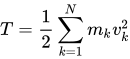
is the total kinetic energy of the system, equalling the sum Σ of the kinetic energies of the particles,[10] and V is the potential energy of the system.

Kinetic energy is the energy of the system’s motion, and vk2 = vk · vk is the magnitude squared of velocity, equivalent to the dot product of the velocity with itself. The kinetic energy is a function only of the velocities vk, not the positions rk nor time t, so T = T(v1, v2, …).

The potential energy of the system reflects the energy of interaction between the particles, i.e. how much energy any one particle will have due to all the others and other external influences. For conservative forces (e.g. Newtonian gravity), it is a function of the position vectors of the particles only, so V = V(r1, r2, …). For those non-conservative forces which can be derived from an appropriate potential (e.g. electromagnetic potential), the velocities will appear also, V = V(r1, r2, …, v1, v2, …). If there is some external field or external driving force changing with time, the potential will change with time, so most generally V = V(r1, r2, …, v1, v2, …, t).


https://en.wikipedia.org/wiki/Lagrangian_mechanics

Using the occ Command — ownCloud 9.0

File Operations

occ has three commands for managing files in ownCloud:

files
 files:cleanup              cleanup filecache
 files:scan                 rescan filesystem
 files:transfer-ownership   All files and folders are moved to another
                            user - shares are moved as well. (Added in 9.0)

The files:scan command scans for new files and updates the file cache. You may rescan all files, per-user, a space-delimited list of users, and limit the search path. If not using --quiet, statistics will be shown at the end of the scan:

sudo -u www-data php occ files:scan --help
  Usage:
  files:scan [-p|--path="..."] [-q|--quiet] [-v|vv|vvv --verbose] [--all]
  [user_id1] ... [user_idN]

Arguments:
  user_id               will rescan all files of the given user(s)

Options:
  --path                limit rescan to the user/path given
  --all                 will rescan all files of all known users
  --quiet               suppress any output
  --verbose             files and directories being processed are shown
                        additionally during scanning

Verbosity levels of -vv or -vvv are automatically reset to -v

When using the --path option, the path must consist of following components:

"user_id/files/path"
  or
"user_id/files/mount_name"
  or
"user_id/files/mount_name/path"

where the term files is mandatory.

Example:

--path="/alice/files/Music"

Source: Using the occ Command — ownCloud 9.0 Server Administration Manual 9.0 documentation

Lambda-CDM model

The ΛCDM (Lambda cold dark matter) or Lambda-CDM model is a parametrization of the Big Bang cosmological model in which the universe contains a cosmological constant, denoted by Lambda (Greek Λ), associated with dark energy, and cold dark matter (abbreviated CDM). It is frequently referred to as the standard model of Big Bang cosmology because it is the simplest model that provides a reasonably good account of the following properties of the cosmos:

The model assumes that general relativity is the correct theory of gravity on cosmological scales. It emerged in the late 1990s as a concordance cosmology, after a period of time when disparate observed properties of the universe appeared mutually inconsistent, and there was no consensus on the makeup of the energy density of the universe.

The ΛCDM model can be extended by adding cosmological inflation, quintessence and other elements that are current areas of speculation and research in cosmology.

Some alternative models challenge the assumptions of the ΛCDM model. Examples of these are modified Newtonian dynamics, modified gravity, theories of large-scale variations in the matter density of the universe, and scale invariance of empty space.


https://en.wikipedia.org/wiki/Lambda-CDM_model


Zoneminder not creating local unix sockets: Socket /var/run/zm/zms-581927s.sock does not exist

1) Keep the default zone apache.conf without the ScriptAlias.

2) Stop both zoneminder and apache2
sudo service apache2 stop
sudo service zoneminder stop

2) Remove any stale sockets from /tmp/zm (default location):
sudo rm -vf /tmp/zm/*.*

3) sudo a2enmod cgi

4) Start zoneminder
sudo service zoneminder start

5) Start apache2
sudo service apache2 start

I found out that the order was important for step 4 and 5, otherwise it doesn’t work

Source: Bug #1159361 “zoneminder not creating local unix sockets for str…” : Bugs : zoneminder package : Ubuntu

Ubuntu Server 16.04 64-bit with Zoneminder 1.30.4 the easy way

Install Zoneminder 1.30.4

Add Repository

NOTE:You may need to run: “apt install software-properties-common” if you did the minimal net install of Ubuntu.

add-apt-repository ppa:iconnor/zoneminder

Update Sources

apt update

Install Zoneminder

apt install zoneminder

Create a new user

adduser www-data video

Enable CGI, Zoneminder and rewrite configuration in Apache.

a2enmod cgi
a2enconf zoneminder
a2enmod rewrite

Fix Permissions

chown -R www-data:www-data /usr/share/zoneminder/

Enable and start Zoneminder

systemctl enable zoneminder
service zoneminder start

Add timezone to PHP

nano /etc/php/7.0/apache2/php.ini

Search for [Date] (Ctrl + w then type Date and press Enter) and make changes as follows for your time zone. Make sure to remove the ; from the front of date.timezone

[Date]
; Defines the default timezone used by the date functions
; http://php.net/date.timezone
date.timezone = America/New_York

Ctrl+o Enter to save

CTRL+x to exit

Restart Apache

service apache2 reload

IMPORTANT FINAL STEP: Open Zoneminder in a web browser (http://server-ip/zm). Click on Options – Paths and change PATH_ZMS to /zm/cgi-bin/nph-zms

Source: https://wiki.zoneminder.com/Ubuntu_Server_16.04_64-bit_with_Zoneminder_1.30.4_the_easy_way

server – How to have two versions of PHP installed and switch easily between them?

I had the same problem when I was handling multiple projects. I referred this article But it was like every time I need to switch the versions if need but this gives the flexibility for cli and web separately.

Moving From php5.6 to php7.0

For Apache, we can use the command as:

sudo a2dismod php5.6 ; sudo a2enmod php7.0 ; sudo service apache2 restart

For CLI, we can use the command as:

sudo update-alternatives --set php /usr/bin/php7.0

Moving From php7.0 to php5.6

For Apache, we can use the command as:

sudo a2dismod php7.0 ; sudo a2enmod php5.6 ; sudo service apache2 restart

For CLI, we can use the command as:

sudo update-alternatives --set php /usr/bin/php5.6

Source: server – How to have two versions of PHP installed and switch easily between them? – Ask Ubuntu