Engineering and technology notes

OpenELEC Mediacenter – OpenELEC Forum – Stutter problem with DOLBY TRUE HD, DTS-HD MA (1/1)

Stutter problem in video with lossless audio DOLBY TRUE HD, DTS-HD MAHi, I can’t play smoothly and happily all videos with an audio lossless trackexample:www.demo-world.eu/download-2d-trailers/?file=hd_thx_terminator_2_lossless-DWEU.m2ts&pic=hd_thx_terminator_2.jpgthe same video in this lossy version plays perfect:www.demo-world.eu/download-2d-trailers/?file=hd_thx_terminator_2-DWEU.m2ts&pic=hd_thx_terminator_2.jpgI tried with overclock, change file location, passthrough ON/OFF, video licences purchased and activated, etc but the video stutters every 5 – 6 seconds. And i see the buffer going down with O button. (P(aq %” Start to be 100%, then go rapidly to 0%, then the movie stops, the buffer goes to 100% and the movie restarts… How to keep that buffer full? or not at 0%?My OC now is at MEDIUMmode ‘Medium’ : 900 | 333 | 450 | 2need to be TURBO?I have the files on NAS, on sd card and on usb stick but nothing changes.. it’s the same.any hints ti solve the problem?I know the track is perfectly useless because RPI doesn’t support lossless audio passthrough, but if I have a file with different audio track it is impossible to play it.None of these videos with lossless track plays without stuttering..www.demo-world.eu/2d-demo-trailers-hd/It’s obvious all my BD lossless rips with HD audio tracks have the same problem…thanks in advanceI use openelec 5.0.3 on my raspi B version.

Source: OpenELEC Mediacenter – OpenELEC Forum – Stutter problem with DOLBY TRUE HD, DTS-HD MA (1/1)

Raspberry Pi • View topic – Create SD card image on windows

Hey guys! I want to know if there is any program I can use to create an image of my Raspi SD Card in Windows so I can keep a backup of a configuration that already works flawlessly. I would like to create an image that I could later burn to my SD card with the Windows program mentioned on the instructions in case I mess something up. Thanks!

Source: Raspberry Pi • View topic – Create SD card image on windows

APC Smart-UPS Dead – Spiceworks

I have an APC Smart-UPS RT 3000VA. It has been disconnected from power for about 12 months. I have now reconnected the UPS and it is stone dead. No lights. No fans turn. I cannot find a Circuit breaher of a fuse which may have tripped or blown. I have left the UPS connected to power for 3 days now and still no life out if it. Can anyone shed some light on this?

Source: APC Smart-UPS Dead – Spiceworks

GitHub – scheckmedia/CameraControllerApi

CameraControllerApi

The CameraControlerApi is an attempt to control a DSLR via REST functionality. At the moment is it possible to change the camera settings (ISO, aperture, time), take pictures and stream the live view of the camera (only tested with a Nikon D90).

Web-Interface

http://device_ip:port/webif/

Demonstration

a demonstration for the CameraControlerApi

How to use

You will get all valid data for a command from the “list” action.

Settings

List the configuration with validate values

http://device_ip:port/settings?action=list

ISO

http://device_ip:port/settings?action=iso&value=200

Aperture

http://device_ip:port/settings?action=aperture&value=f/22

Shutter Speed

http://device_ip:port/settings?action=speed&value=1/1000

Whitebalance

http://device_ip:port/settings?action=whitebalance&value=Cloudy

Capture

take a picture

http://device_ip:port/capture?action=shot

autofocus

http://device_ip:port/capture?action=autofocus

File system

list of the available images on camera

http://device_ip:port/fs?action=list

get an image

http://device_ip:port/fs?action=get&value=filename.jpg&path=/path/to/file

Each method will response with a JSON file. If you want a XML response you have to put the command “&type=xml” on the end of the upper commands

Live View

live view will be generated as mjpeg-stream. you can easy implement this stream in html inside an image tag e.g:

<!DOCTYPE html>
<html>
<head>
<meta charset="UTF-8">
<title>Live View</title>
</head>

<body>
<img src="https://localhost:8888/liveview" />
</body>

</html>

Dependencies

apt-get install libboost-dev libboost-system-dev libmicrohttpd-dev libgphoto2-dev libexiv2-dev

  • libgphoto
  • libboost
  • libboost-system
  • libmicrohttpd
  • libexiv2

Source: GitHub – scheckmedia/CameraControllerApi

Xcas

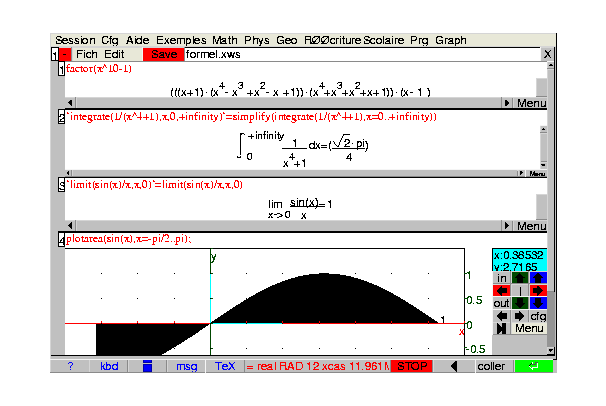
Xcas is a user interface to Giac, a free, basic Computer Algebra System (CAS) for Windows, macOS and Linux/Unix. Giac can be used directly inside other C++ programs. Xcas/Giac is an open-source project developed by Bernard Parisse’s et al. at the Joseph Fourier University of Grenoble (Isère) since 2000. It is based on experiences gained with Parisse’s former project Erable. Giac has a compatibility mode with Maple and MuPAD software and TI-89, TI-92 and Voyage 200 calculators. Users can use Giac/Xcas as

Source: Xcas – Wikipedia

Comparison of Texas Instruments graphing calculators

A graphing calculator is a class of hand-held calculator that is capable of plotting graphs and solving complex functions. There are several companies that manufacture models of graphing calculators. Texas Instruments is a major manufacturer. The following table compares general and technical information for a selection of common and uncommon Texas Instruments graphing calculators. See the individual calculators’ articles for further information.

Source: Comparison of Texas Instruments graphing calculators – Wikipedia

Comparison of HP graphing calculators

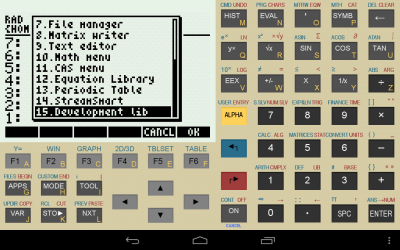
A graphing calculator is a class of hand-held calculator that is capable of plotting graphs and solving complex functions. While there are several companies that manufacture models of graphing calculators, Hewlett-Packard is a major manufacturer. The following table compares general and technical information for a selection of common and uncommon Hewlett-Packard graphing calculators. See the individual calculators’ articles for further information.

Source: Comparison of HP graphing calculators – Wikipedia