Source: Arduino Playground – Email
Arduino Playground – Email
 Jovan Stosic
Jovan Stosic
Jovan Stosic
Source: Arduino Playground – Email
Jovan Stosic
Jovan Stosic
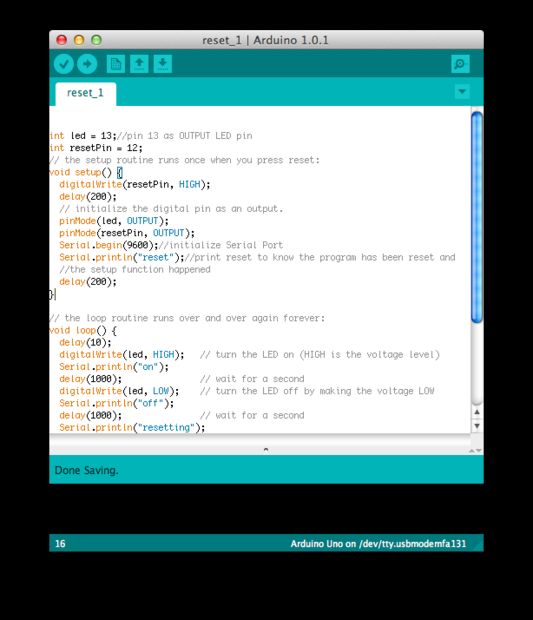
If you want to RESET Arduino from the beginning without manually pressing the RESET button, there are a few ways. Here are two ways, using minimal wiring / circuitry.
Jovan Stosic
This tutorial explains how to setup mail server on ubuntu 14.04 using postfix,dovecot and squirrelmail.
» Postfix ( for sending )
» Dovecot ( for receiving )
» Squirrelmail ( for webmail access ).
Here i have used mail.krizna.com for hostname and krizna.com for Domain . please replace with your domain
Source: Setup mail server on ubuntu 14.04 ( Postfix – dovecot )
Jovan Stosic
Source: ZTE ZXV10-H201L [OpenWrt Wiki]
Jovan Stosic
Generate any number of random MAC addresses with multiple options.
Jovan Stosic
One of the most common steps to take when setting up a new server is to install a LAMP stack. LAMP stands for Linux, Apache, MySQL, and PHP. These individual components, when used together, allow us to host dynamic web content like websites and web ap
Source: How To Install Linux, Apache, MySQL, PHP (LAMP) stack on Ubuntu 14.04 | DigitalOcean
Jovan Stosic
(PHP 7)
random_bytes — Generates cryptographically secure pseudo-random bytes
Description 
string random_bytes ( int$length)Generates an arbitrary length string of cryptographic random bytes that are suitable for cryptographic use, such as when generating salts, keys or initialization vectors.
The sources of randomness used for this function are as follows:
- On Windows, » CryptGenRandom() will always be used.
- On Linux, the » getrandom(2) syscall will be used if available.
- On other platforms, /dev/urandom will be used.
- If none of the aforementioned sources are available, then an Exception will be thrown.
Source: PHP: random_bytes – Manual
Jovan Stosic
Over the past year or so there have been a few times where I’ve need to expand a disk attached to a Debian system. Now this isn’t a hard task by any means, and may not even warrant a blog post, but the matter of it is that I always seem to forget the steps I need to take to get that unallocated space that I’ve added next to my actual EXT3 partition since the swap partition is always in the way! So, I thought I would just throw up how I’ve done it in the past in hopes to maybe help a few others that visit, but more-so for myself and my memory (or lack there of). Now keep in mind I’m sure there are ways to perform this exact same thing without taking the VM online, or I’m sure there are other ‘better’ ways to achieve the same results, but this way has worked for me consistently so it’s what I chose to do. Any other suggestions are certainly welcome in the comment box below.First off, you will need to expand your drive from within the vSphere Client, not rocket science here, pretty simple to do. Next, get yourself a copy of gparted and mount the ISO to your VM and reboot booting into the gparted interface (accept all defaults for keymap, X, and resolutions, unless of course you like playing…). So the first thing you will notice inside gparted is that the swap partition is right smack in the middle of your EXT3 partition and the unallocated space. Normally, you could just resize the EXT3 partition and consume the unallocated space, but with swap there you can’t.
Source: Expanding a Linux disk with gparted (and getting swap out of the way) | mwpreston.net
Jovan Stosic
I have an existing site (social in nature) and it already has a mobile web version too, so what I basically want to do is wrap that view in an Android app and maybe add a nice splash screen to it. So essentially a “branded” browser window.Any advice would be appreciated.
Source: jquery – Wrapping HTML in an app for Android – Stack Overflow
Jovan Stosic
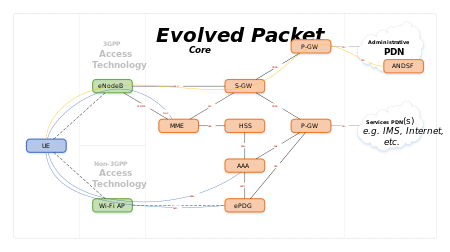
System Architecture Evolution (SAE) is the core network architecture of 3GPP‘s LTE wireless communication standard.
SAE is the evolution of the GPRS Core Network, with some differences:
- simplified architecture
- all-IP Network (AIPN)
- support for higher throughput and lower latency radio access networks (RANs)
- support for, and mobility between, multiple heterogeneous access networks, including E-UTRA (LTE and LTE Advanced air interface), 3GPP legacy systems (for example GERAN or UTRAN, air interfaces of GPRS and UMTS respectively), but also non-3GPP systems (for example WiFi, WiMAX or cdma2000)
Jovan Stosic
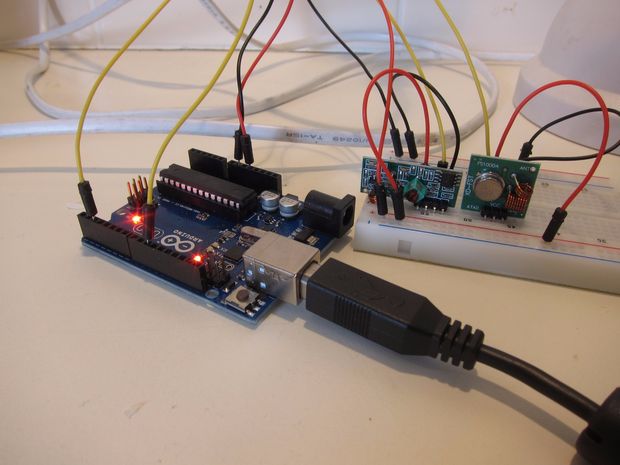
In this tutorial I’ll show you how to use an Arduino to decode signals from RF remotes, and re-send them to remotely control some mains switches and a garage door.Note: This guide was written for Australia, where it’s legal to operate low powered devices (25mW) in the 433MHz band without a licence. Check what’s legal in your own country. If you’re transmitting to (or on the same frequency as) a garage door opener / RC toy etc that you bought in your own country, it should be fine, provided you stick to the power limit.
Source: Decoding and sending 433MHz RF codes with Arduino and rc-switch