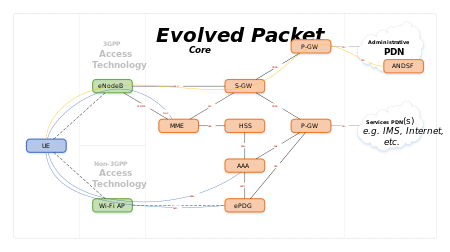
System Architecture Evolution (SAE) is the core network architecture of 3GPP‘s LTE wireless communication standard.
SAE is the evolution of the GPRS Core Network, with some differences:
- simplified architecture
- all-IP Network (AIPN)
- support for higher throughput and lower latency radio access networks (RANs)
- support for, and mobility between, multiple heterogeneous access networks, including E-UTRA (LTE and LTE Advanced air interface), 3GPP legacy systems (for example GERAN or UTRAN, air interfaces of GPRS and UMTS respectively), but also non-3GPP systems (for example WiFi, WiMAX or cdma2000)
Engineering and technology notes
Decoding and sending 433MHz RF codes with Arduino and rc-switch
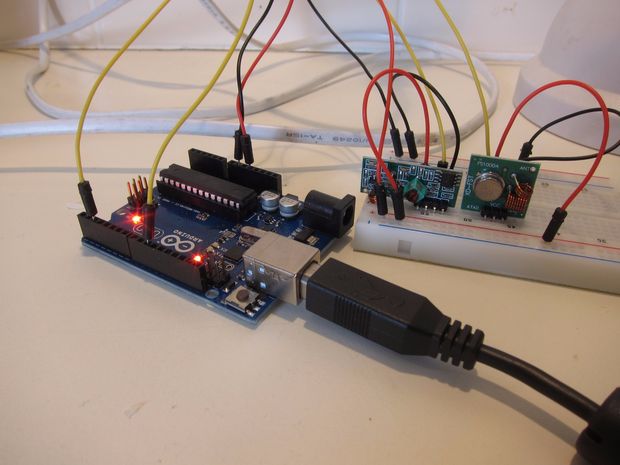
In this tutorial I’ll show you how to use an Arduino to decode signals from RF remotes, and re-send them to remotely control some mains switches and a garage door.Note: This guide was written for Australia, where it’s legal to operate low powered devices (25mW) in the 433MHz band without a licence. Check what’s legal in your own country. If you’re transmitting to (or on the same frequency as) a garage door opener / RC toy etc that you bought in your own country, it should be fine, provided you stick to the power limit.
Source: Decoding and sending 433MHz RF codes with Arduino and rc-switch
Inserting, updating, and deleting data in MySQL
Inserting, updating, and deleting data in MySQLIn this part of the MySQL tutorial, we will insert, update and delete data from MySQL tables. We will use the INSERT, DELETE and UPDATE statements. These statements are part of the SQL Data Manipulation Language, DML.
Restart loop after interrupt?
Does anyone know if it is possible to start a program from the beginning of the loop() function after an external interrupt has been executed instead of picking up where it left off?
I have a program which checks the speed of the car, distance traveled, average speed etc.. and when the interrupt is activated, it is supposed to toggle through the different modes. The problem I have is that if the car is standing still and the magnets are not passing the reed switch, I need to wait 6 seconds for each screen to advance. I would like to make it so that it advances instantaneously and causing the program to start from the beginning of the loop after the interrupt has been tripped would do this. If anyone knows of another solution that would work, please let me know and so I could try that.
Source: Restart loop after interrupt?
Adi Roiban – Monitor the UPS in Ubuntu with Network UPS Tools
Monitor the UPS in Ubuntu with Network UPS Tools
I just found this great project called Network UPS Tools or nut . It comes with fully loaded with tools for monitoring local UPS, remote UPS and displaying the status via a weg page. My installation is using an Must PowerAgent 1060, connected via USB.
Installing the software is easy, just use the magic words:
sudo apt-get install nut nut-cgiTo configure nut on Ubuntu I start by reading this guide by a mysterious person named Shady Pixel.
First I checked my driver suitable for my model in the Hardware Compatibility List. The model I use is not in the list, but Must is related to Mustek and all Mustek models were using blazer_usb driver. So I went for blazer_usb.
I added the following section in /etc/nut/ups.conf (you can replace must-pa-1060 with your preferred name for the UPS):
# /etc/nut/ups.conf [must-pa-1060] driver = blazer_usb port = autoI looked for the Bus and Device number together with Vendor and Product in lsusb.
I changed the permission to 666 for /dev/bus/usb/BID/DID (replace BID with your USB bus ID, and DID with device ID). To automatically set the permission for future connections I added the following udev rule:
#/etc/udev/rules.d/10-must-pa-1060.rules SYSFS{idVendor}=='0665', SYSFS{idProduct}=='5161', MODE='0666'Then I started the UPS driver via:
$ sudo upsdrvctl startIf you get some errors like the one below, check the USB device permissions:
Can't claim USB device [0665:5161]: could not detach kernel driver from interface 0: Operation not permitted Driver failed to start (exit status=1)Now that the UPS driver is started, lets monitor it and export the status via the CGI script.
You will have to configure the mode in which nut will run. Edit /etc/nut/nut.conf and add your preferred mode:
# /etc/nut/nut.conf MODE=standaloneAdd an UPS daemon user via /etc/nut/upsd.users:
# /etc/nut/upsd.users [ups_admin] password = a password here upsmon masterConfigure the monitor to connect to this daemon via /etc/nut/upsmon.conf:
# /etc/nut/upsmon.conf MONITOR must-pa-1060@localhost 1 ups_admin the_password_here masterNow you can start the nut daemon and ups monitor via nut service:
sudo service nut startTo monitor the UPS via the web CGI script I added the following line to/etc/nut/hosts.conf:
# /etc/nut/hosts.conf MONITOR must-pa-1060@localhost 'Must PowerAgent 1060'Now you can access the CGI script via:
http://HOSTNAME/cgi-bin/nut/upsstats.cgiEnjoy!
Source: Adi Roiban – Monitor the UPS in Ubuntu with Network UPS Tools
Uninterruptable Power Supply – SME Server
Modifying NUT UPS shutdown delay.
Hello All!
I’ve recently configured a new Power Shield Defender 650VA UPS on my home SME server and it is working well. I would, however, like to change the shutdown behavior of the server.
At the moment, when the UPS goes to battery, the server continues to operate until the UPS sends the “battery low” warning, at which point it auto-shuts down. I would like to change the configuration so that the server will shut down 2 minutes after receiving the “on battery” signal.
What is the best way to achieve this?
Thanks in advance.
P.S. For those Aussies who are thinking about getting one of these UPS’, I configured NUT to use the megatec_usb driver and set the port to “auto”.
HOWTO: Set Up NUT, the Network UPS Tools
Ted Felix
Note: This page is incomplete. I will remove this when I have successfully completed configuring my UPS with NUT.
The power goes out all the time here, so I decided to take a shot at setting up a UPS and having the server shutdown when the power goes out. This turned out to be pretty difficult as the “Network UPS Tools” are a bit of a pain to set up. Here are my notes so far…
UPS’s from Dell, MGE, and Eaton appear to be fully supported by NUT. Others should work, but if you can find one of those, it’s guaranteed to work.
The ubuntu package is “nut”:
$ sudo apt-get install nutNUT is very painful to configure. Follow these steps carefully. The blasterspike.it link appears to be the best.
Identify UPS and Driver
Identify UPS. lsusb works for USB connected UPS’s. In my case, I have a “Cyber Power Systems CP1500AVR USB”.
$ lsusb ... Bus 001 Device 003: ID 0764:0501 Cyber Power System, Inc. CP1500 AVR UPSCheck the NUT Hardware Compatibility List to figure out which driver will work for your UPS. For my USB UPS, the correct driver is “usbhid-ups”.
Update ups.conf and Test
Add a new section to /etc/nut/ups.conf for the ups. I picked “serverups” for the name. “ups” would probably be better for a simple setup like mine.
[serverups] driver = usbhid-ups port = auto desc = "Server UPS"- Install udev rules for usbhid-ups (see man usbhid-ups INSTALLATION) sudo cp /lib/udev/rules.d/52-nut-usbups.rules /etc/udev/rules.d/ reboot - Set up /var/run/nut per http://www.blasterspike.it/2011/03/28/how-to-install-nut-on-ubuntu-10-10-maverick-meerkat/ sudo mkdir /var/run/nut sudo chown root:nut /var/run/nut sudo chmod 770 /var/run/nut - Test the ups.conf file: sudo upsdrvctl start Normal output: Network UPS Tools - UPS driver controller 2.6.3 Network UPS Tools - Generic HID driver 0.35 (2.6.3) USB communication driver 0.31 Using subdriver: CyberPower HID 0.3upsd
- Launch upsd sudo upsd Normal output: Network UPS Tools upsd 2.6.3 listening on 127.0.0.1 port 3493 listening on ::1 port 3493 Connected to UPS [serverups]: usbhid-ups-serverups - Test the upsd with upsc sudo upsc serverups@localhost Should see values for a lot of variables.More steps…
- Continue with the blasterspike.it steps. They seem to be good. http://www.blasterspike.it/2011/03/28/how-to-install-nut-on-ubuntu-10-10-maverick-meerkat/ - upsd.users - Need to add a user id for upsmon to login. - upsmon.conf - Need to add a line to monitor the ups. - nut.conf - Set the mode. - Start it up at boot. blasterspike uses the old "service" to start this. Is upstart an option? It might be if we set it up ourselves. As it stands, initctl does not appear to know of it. See /etc/init.d/nut.Five Minutes?
- Configure it to shutdown after 5 minutes instead of when the UPS goes critical. I don't see a way to do this anywhere. Strange. What exactly is its criteria for shutting down? 10% battery left? It's a UPS data item: battery.charge: 100 (percent) battery.charge.low: 10 (percent, this is when shutdown will occur) battery.charge.warning: 20 (percent) battery.runtime: 2887 (seconds) battery.runtime.low: 300 (seconds, this is when shutdown will occur) I think you can tweak this in one of the config files. There's an override. But this doesn't seem ideal. There's no way to say that it should shutdown after 5 minutes (if it can last that long).References
How To Install NUT – Great article with all the steps.
Network UPS Tools – NUT
NUT Documentation
nut manual section 3.9 “One UPS, one computer. This is also known as “Standalone” configuration. This is the configuration that most users will use. You need at least a driver, upsd, and upsmon running.”
5.2 “Configuration files are located in /etc/nut. nut.conf(5) must be edited to be able to invoke /etc/init.d/nut”
Section 6 of the docs covers setup. Basically, the ups.conf file has to have an entry for the ups. Then it will work. (If only that were it!)
Config files for NUT: nut.conf(5), ups.conf(5), upsd.conf(5), upsd.users(5), upsmon.conf(5)
http://archive09.linux.com/feature/128099 – Not sure this is any good.
“Failed to load platform plugin “xcb” ” while launching qt5 app on linux without qt installed – Stack Overflow
I wrote application for linux which uses Qt5.But when I am trying to launch it on the linux without Qt SDK installed, the output in console is: Failed to load platform plugin “xcb”. Available
[SOLVED] error while loading shared libraries: libstdc++-libc6.2-2.so.3 – Page 2
I’m trying to run the Linux version of Return to Castle Wolfenstein, but I get the following errors: clevelandrock@Centurion:~$ wolf ./wolf.x86: error while loading shared libraries: libstdc++-libc6.2-2.so.3: cannot open shared object file: No such file or directory clevelandrock@Centurion:~$ apt-file search libstdc++-libc6.2-2.so.3 clevelandrock@Centurion:~$ uname -a Linux Centurion 2.6.32-23-generic #37-Ubuntu SMP Fri Jun 11 07:54:58 UTC 2010 i686 GNU/Linux clevelandrock@Centurion:~$
Source: [SOLVED] error while loading shared libraries: libstdc++-libc6.2-2.so.3 – Page 2
[help]Install QT4 in Ubuntu
I want to learn QT4 in Ubuntu,I have installed it in WindowsXP,but it has some problem in linux.Can’t make the program. I want to use synaptic to install the QT4,QT assistant,QT designer,can you tell me how to do.
Source: [help]Install QT4 in Ubuntu
Were must be libqt.so.2? / Newbie Corner / Arch Linux Forums
I want install waveforge and write, that need libqt.so.2.
I download from internet libqt.so.2 and do not know were paste it.
[al@myhost ~]$ ‘/home/al/tar.gz,tgz/waveforge.0.1.2/WaveForge’
/home/al/tar.gz,tgz/waveforge.0.1.2/WaveForge: error while loading shared libraries: libqt.so.2: cannot open shared object file: No such file or directory
Source: Were must be libqt.so.2? / Newbie Corner / Arch Linux Forums