So here’s an interesting situation I ran into when using Windows 7 connected to both my Ethernet network and my wireless network at home: whenever I would
Source: Force Windows 7 to Use Wired Connection over Wireless
 Jovan Stosic
So here’s an interesting situation I ran into when using Windows 7 connected to both my Ethernet network and my wireless network at home: whenever I would
Source: Force Windows 7 to Use Wired Connection over Wireless
Jovan Stosic
 MySQL replication is a core process for maintaining multiple copies of data – and replication is a very important aspect in database administration. In order to synchronize data between master and slaves you need to make sure that data transfers smoothly, and to do so you need to act promptly regarding replication errors to continue data synchronization. Here on the Percona Support team, we often help customers with replication broken-related issues. In this post I’ll highlight the top most critical replication error code 1236 along with the causes and cure. MySQL replication error “Got fatal error 1236” can be triggered by multiple reasons and I will try to cover all of them.
Source: MySQL Replication: ‘Got fatal error 1236’ causes and cures
Jovan Stosic
Jovan Stosic
My disk space is dwindling by about 2GB a day! I only have a few more days before I run out of space.
$ df -h
Filesystem            Size  Used Avail Use% Mounted on
/dev/sda4             143G  126G   11G  93% /
udev                  491M  4.0K  491M   1% /dev
tmpfs                 200M  696K  199M   1% /run
none                  5.0M     0  5.0M   0% /run/lock
none                  499M  144K  499M   1% /run/shm
/dev/sda2             1.9G  580M  1.2G  33% /tmp
/dev/sda1              92M   29M   58M  33% /boot
I have been searching for the biggest directories/log files, deleting and compressing. But I am still losing the war. Finally, I realised I have a big misunderstanding:
julian@server1:~$ sudo du -h / | tail -n 1
16G     /
All of my files in / only add up to 16 GB. That leaves 110 GB unaccounted for!
Clearly I have a misunderstanding: I thought the ‘/dev/sda4’ line represented all the files visible from ‘/’. What should I be reading to understand where the other storage has gone?
More details:
.
 du: cannot access `/home/julian/.gvfs': Permission denied
 du: cannot access `/proc/10841/task/10841/fd/4': No such file or directory
 du: cannot access `/proc/10841/task/10841/fdinfo/4': No such file or directory
 du: cannot access `/proc/10841/fd/4': No such file or directory
 du: cannot access `/proc/10841/fdinfo/4': No such file or directory
Source: The Mystery of the Vanishing Disk Space – Ask Ubuntu
Jovan Stosic
Jovan Stosic
LibreELEC is ‘Just enough OS’ for Kodi, a Linux distribution built to run Kodi on current and popular mediacentre hardware. We are an evolution of the popular OpenELEC project. LibreELEC software will be familiar to OpenELEC users, but the project follows its own path and has intentional differences.
https://libreelec.tv/about/
Jovan Stosic
Jovan Stosic
Jovan Stosic
Jovan Stosic
Abstract: USB On-the-Go (OTG) allows two USB devices to talk to each other without requiring the services of a personal computer. Although OTG appears to add “peer to peer” connections to USB, it does not. Instead, USB OTG retains the standard USB host/peripheral model, where a single host talks to USB peripherals. OTG introduces the dual-role device (DRD), capable of functioning as either host or peripheral. Part of the magic of OTG is that a host and peripheral can exchange roles if necessary.
Before OTG, the concept of an embedded host was already established in the USB world. Instead of duplicating the full UHCI/OHCI USB controllers and drivers built into personal computers, most embedded host chips provide limited hosting capabilities. This makes them better suited to the embedded environment than to the PC with its huge resources and infinite capacity for drivers and application software.
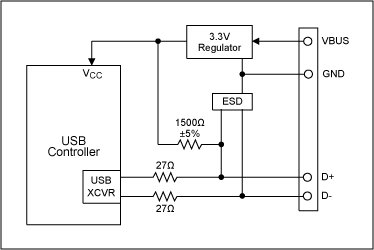
IntroductionUSB On-the-Go (OTG) allows two USB devices to talk to each other without requiring the services of a personal computer (PC). Although OTG appears to add peer-to-peer connections to the USB world, it does not. Instead, USB OTG retains the standard USB host/peripheral model, in which a single host talks to USB peripherals. OTG does introduce, however, the dual-role device, or simply stated, a device capable of functioning as either host or peripheral. Part of the magic of OTG is that a host and peripheral can exchange roles if necessary. Before OTG, the concept of an embedded host was already established in the USB world. Instead of duplicating the full UHCI/OHCI USB controllers and drivers built into PCs, most embedded host chips provide limited hosting capabilities. This makes them better suited to the embedded environment than a PC with its huge resources and infinite capacity for drivers and application software. An OTG device may, or may not be capable of functioning as a host. It is likely, nonetheless, that most OTG devices will be dual-role. USB PeripheralsFigure 1 illustrates the basic USB peripheral circuitry on which OTG builds. These example peripherals operate at low or full speed, and are commonly known as USB 1.1 devices. This nomenclature is used even though the USB 2.0 Specification includes the current USB 1.1 specification and introduces a third, higher speed.
The controller in Figure 1 might be a microprocessor plus USB SIE (Serial Interface Engine), an integrated microprocessor/USB chip, or an ASIC connected to a USB transceiver. A bus-powered peripheral requires a 3.3V regulator, both to power the logic and to supply the proper voltage to a 1500Ω resistor connected to either the D+ or D- USB pins. This pullup resistor signals the host that a device is connected, and indicates the device’s operating speed. A pullup to D+ indicates full speed; a pullup to D- indicates low speed. The other end of the connection—host or hub—contains 15kΩ pulldown resistors on D+ and D- so the pullup resistor can be detected. Finally, an ESD protection circuit is advisable on D+, D-, and VBUS pins because USB is designed to be hot-plugged. How to Be a HostThe Figure 1 circuit functions only as a USB peripheral device. To add OTG dual-role capability, the transceiver must be augmented to allow the OTG device to function as either host or peripheral. Adding the following to Figure 1 lets the system also function as a host:
The ASIC or controller must also contain logic to function as a USB host. Some of the host duties absent in a peripheral device are:
In addition to requiring a dual-role peripheral/host USB controller, OTG requires additional circuitry to support two new protocols, called HNP and SRP. Host Negotiation ProtocolAn OTG dual-role device can operate either as a host or peripheral. In OTG nomenclature, the initial host is called the A-Device, and the initial peripheral is called the B-Device. The word initial is important. Once connected, OTG dual-role devices can exchange roles—host and peripheral—by using the new Host Negotiation Protocol (HNP). HNP raises two obvious questions: (a) how are the initial roles determined; and (b) why is the role reversal necessary?
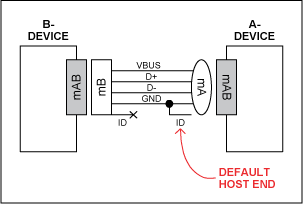
The cable orientation determines the initial roles (Figure 2). Dual-role devices use a new receptacle called the mini-AB. The mini-A plug, the mini-B plug and the mini-AB receptacle add a fifth pin (ID) to give different electrical identities to the cable ends. This fifth ID pin is connected to ground inside the mini-A plug and left floating in the mini-B plug. The OTG device receiving the grounded ID pin is the default A-Device (host); the device with the floating ID pin is the default B-Device (peripheral).
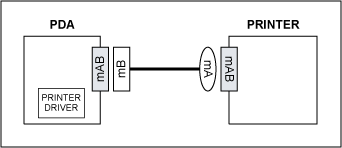
To understand the need for the HNP and host/peripheral role reversal, the example in Figure 3 shows two dual-role devices, a PDA and a printer. The PDA has a printer driver inside. The two devices are connected with the new OTG cable as shown, making the printer the default host (A-Device) and the PDA the default peripheral (B-Device). But this setup is backwards. The PDA, which has the printer driver, needs to act as USB host to the printer, which contains no driver. Rather than bothering the user to reverse the cable, HNP allows the devices’ roles to reverse automatically and silently. Session Request ProtocolThe OTG Specification adds a second new protocol to USB, called Session Request Protocol (SRP). SRP allows a B-Device to request an A-Device to turn on VBUS power and start a session. An OTG session is defined as the time that the A-Device is furnishing VBUS power. (Note: the A-Device always supplies VBUS power, even if it is functioning as a peripheral due to HNP.) The A-Device can end a session by turning off VBUS to conserver power, a very important requirement in a battery-powered device such as a cell phone.
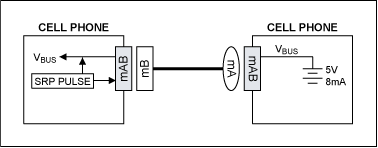
Figure 4 shows a common OTG application: two cell phones connected together to exchange information. The right phone received the mini-A end of the cable, making it the A-Device and thus defaulting into the host role. The left phone is the B-Device, defaulting to peripheral. If there is no need to communicate over USB, the A-Device can power down the VBUS wire, which the B-Device can detect so that it too can enter a low-power state. Now suppose that the user of the left phone presses a button to synchronize address books, or any other action that requires a USB session. The ‘SRP Pulse’ block in the left phone pulses first the D+ wire, and then the VBUS wire to wake up the A-Device. (The A-Device can respond either to D+ or VBUS pulsing.) The A-Device then detects the pulse, causing it to switch on VBUS and start a session. The SRP protocol is more complex than this simple illustration. The B-Device, for example, must first measure VBUS to ensure that a session is not in progress. It must also be able to differentiate between a classic PC or an OTG device at the other end of the cable. It does this by delivering measured amounts of current to the VBUS wire and noting the resulting voltage. Once a session is underway, the devices may or may not use HNP. OTG TransceiverWe are now ready to examine the requirements for an OTG transceiver, illustrated in Figure 5.
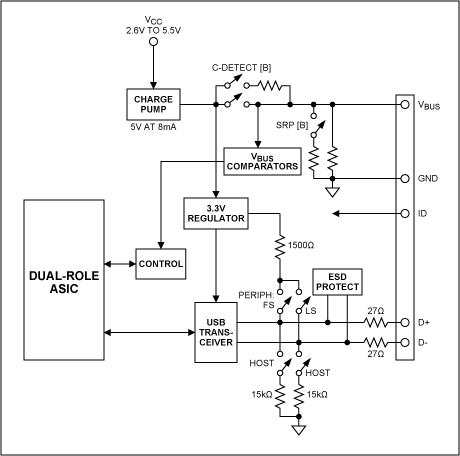
The Figure 5 system builds on the Figure 1example circuit. The ASIC block could also be a microprocessor or DSP with USB capability. Three additions make the transceiver OTG compatible:
For this system to operate as a dual-role OTG device, the ASIC, DSP, or whatever is connected to the transceiver must be capable both of functioning as a peripheral or host, and of switching roles on-the-fly as a result of HNP. Most of the added transceiver circuitry manages the VBUS pin, which now must also supply 5V power at 8mA as a host, and perform VBUS pulsing as a peripheral. Analog switches configure the transceiver for the various roles that it must play. |
|
||||||||||||||||
Jovan Stosic
Jovan Stosic
“More than 69 million Netflix members stream billions of hours of movies and shows every month in North and South America, parts of Europe and Asia, Australia and New Zealand. Soon, Netflix will be available in every corner of the world with an even more global member base.” This is the opening paragraph of a Dec. 10 Netflix blog by Nirmal Govind and Athula Balachandran in which they talk about how they are working to improve the Netflix streaming experience using data science.
 Read this Next
 Review Featured Products
 Visit the Product Page