Engineering and technology notes

USB On-the-Go Basics – Tutorial – Maxim

Abstract: USB On-the-Go (OTG) allows two USB devices to talk to each other without requiring the services of a personal computer. Although OTG appears to add “peer to peer” connections to USB, it does not. Instead, USB OTG retains the standard USB host/peripheral model, where a single host talks to USB peripherals. OTG introduces the dual-role device (DRD), capable of functioning as either host or peripheral. Part of the magic of OTG is that a host and peripheral can exchange roles if necessary.

Before OTG, the concept of an embedded host was already established in the USB world. Instead of duplicating the full UHCI/OHCI USB controllers and drivers built into personal computers, most embedded host chips provide limited hosting capabilities. This makes them better suited to the embedded environment than to the PC with its huge resources and infinite capacity for drivers and application software.

Introduction

USB On-the-Go (OTG) allows two USB devices to talk to each other without requiring the services of a personal computer (PC). Although OTG appears to add peer-to-peer connections to the USB world, it does not. Instead, USB OTG retains the standard USB host/peripheral model, in which a single host talks to USB peripherals. OTG does introduce, however, the dual-role device, or simply stated, a device capable of functioning as either host or peripheral. Part of the magic of OTG is that a host and peripheral can exchange roles if necessary.

Before OTG, the concept of an embedded host was already established in the USB world. Instead of duplicating the full UHCI/OHCI USB controllers and drivers built into PCs, most embedded host chips provide limited hosting capabilities. This makes them better suited to the embedded environment than a PC with its huge resources and infinite capacity for drivers and application software.

An OTG device may, or may not be capable of functioning as a host. It is likely, nonetheless, that most OTG devices will be dual-role.

USB Peripherals

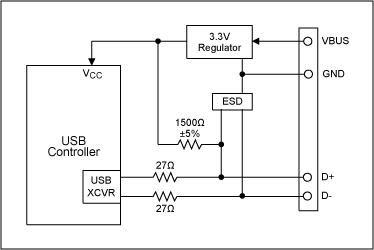
Figure 1 illustrates the basic USB peripheral circuitry on which OTG builds. These example peripherals operate at low or full speed, and are commonly known as USB 1.1 devices. This nomenclature is used even though the USB 2.0 Specification includes the current USB 1.1 specification and introduces a third, higher speed.

Figure 1. A USB peripheral controller and its associated circuitry.

The controller in Figure 1 might be a microprocessor plus USB SIE (Serial Interface Engine), an integrated microprocessor/USB chip, or an ASIC connected to a USB transceiver. A bus-powered peripheral requires a 3.3V regulator, both to power the logic and to supply the proper voltage to a 1500Ω resistor connected to either the D+ or D- USB pins. This pullup resistor signals the host that a device is connected, and indicates the device’s operating speed. A pullup to D+ indicates full speed; a pullup to D- indicates low speed. The other end of the connection—host or hub—contains 15kΩ pulldown resistors on D+ and D- so the pullup resistor can be detected. Finally, an ESD protection circuit is advisable on D+, D-, and VBUS pins because USB is designed to be hot-plugged.

How to Be a Host

The Figure 1 circuit functions only as a USB peripheral device. To add OTG dual-role capability, the transceiver must be augmented to allow the OTG device to function as either host or peripheral. Adding the following to Figure 1 lets the system also function as a host:

  • 15kΩ pulldown resistors on D+ and D-
  • A means to supply, rather than draw, power on VBUS

The ASIC or controller must also contain logic to function as a USB host. Some of the host duties absent in a peripheral device are:

  • Send SOF (Start of Frame) packets.
  • Send SETUP, IN, and OUT packets.
  • Schedule transfers within USB 1ms frames.
  • Signal USB reset.
  • Provide USB power management.

In addition to requiring a dual-role peripheral/host USB controller, OTG requires additional circuitry to support two new protocols, called HNP and SRP.

Host Negotiation Protocol

An OTG dual-role device can operate either as a host or peripheral. In OTG nomenclature, the initial host is called the A-Device, and the initial peripheral is called the B-Device. The word initial is important. Once connected, OTG dual-role devices can exchange roles—host and peripheral—by using the new Host Negotiation Protocol (HNP). HNP raises two obvious questions: (a) how are the initial roles determined; and (b) why is the role reversal necessary?

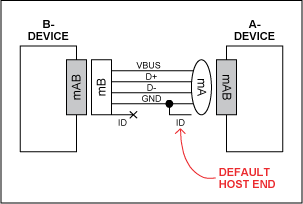
Figure 2. Fifth ID pin determines default host.

The cable orientation determines the initial roles (Figure 2). Dual-role devices use a new receptacle called the mini-AB. The mini-A plug, the mini-B plug and the mini-AB receptacle add a fifth pin (ID) to give different electrical identities to the cable ends. This fifth ID pin is connected to ground inside the mini-A plug and left floating in the mini-B plug. The OTG device receiving the grounded ID pin is the default A-Device (host); the device with the floating ID pin is the default B-Device (peripheral).

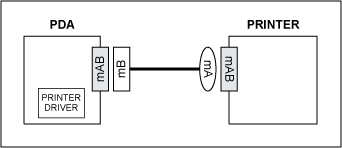
Figure 3. OTG cable is inserted backwards.

To understand the need for the HNP and host/peripheral role reversal, the example in Figure 3 shows two dual-role devices, a PDA and a printer. The PDA has a printer driver inside. The two devices are connected with the new OTG cable as shown, making the printer the default host (A-Device) and the PDA the default peripheral (B-Device). But this setup is backwards. The PDA, which has the printer driver, needs to act as USB host to the printer, which contains no driver. Rather than bothering the user to reverse the cable, HNP allows the devices’ roles to reverse automatically and silently.

Session Request Protocol

The OTG Specification adds a second new protocol to USB, called Session Request Protocol (SRP). SRP allows a B-Device to request an A-Device to turn on VBUS power and start a session.

An OTG session is defined as the time that the A-Device is furnishing VBUS power. (Note: the A-Device always supplies VBUS power, even if it is functioning as a peripheral due to HNP.) The A-Device can end a session by turning off VBUS to conserver power, a very important requirement in a battery-powered device such as a cell phone.

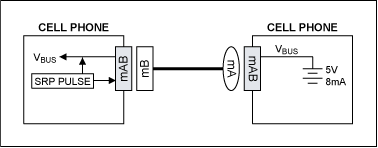
Figure 4. OTG Session Request Protocol (SRP).

Figure 4 shows a common OTG application: two cell phones connected together to exchange information. The right phone received the mini-A end of the cable, making it the A-Device and thus defaulting into the host role. The left phone is the B-Device, defaulting to peripheral. If there is no need to communicate over USB, the A-Device can power down the VBUS wire, which the B-Device can detect so that it too can enter a low-power state.

Now suppose that the user of the left phone presses a button to synchronize address books, or any other action that requires a USB session. The ‘SRP Pulse’ block in the left phone pulses first the D+ wire, and then the VBUS wire to wake up the A-Device. (The A-Device can respond either to D+ or VBUS pulsing.) The A-Device then detects the pulse, causing it to switch on VBUS and start a session.

The SRP protocol is more complex than this simple illustration. The B-Device, for example, must first measure VBUS to ensure that a session is not in progress. It must also be able to differentiate between a classic PC or an OTG device at the other end of the cable. It does this by delivering measured amounts of current to the VBUS wire and noting the resulting voltage.

Once a session is underway, the devices may or may not use HNP.

OTG Transceiver

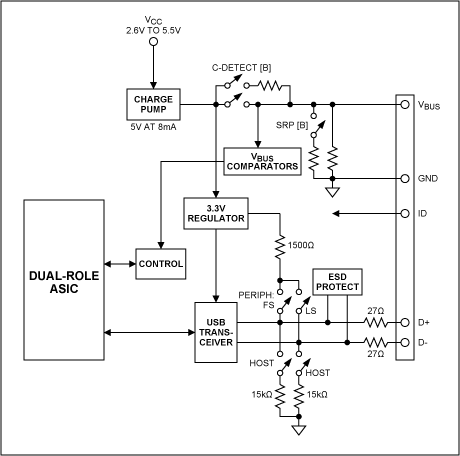
We are now ready to examine the requirements for an OTG transceiver, illustrated in Figure 5.

Figure 5. An OTG transceiver.

The Figure 5 system builds on the Figure 1example circuit. The ASIC block could also be a microprocessor or DSP with USB capability. Three additions make the transceiver OTG compatible:

  1. Switchable pull-up and pull-down resistors on D+/D- to allow peripheral or host functionality.
  2. Circuitry to monitor and supply 5V power on VBUS as an A-Device, and to monitor and pulse VBUS as a B-Device initiating SRP.
  3. An ID input pin, which is made available as an output to the ASIC.

For this system to operate as a dual-role OTG device, the ASIC, DSP, or whatever is connected to the transceiver must be capable both of functioning as a peripheral or host, and of switching roles on-the-fly as a result of HNP.

Most of the added transceiver circuitry manages the VBUS pin, which now must also supply 5V power at 8mA as a host, and perform VBUS pulsing as a peripheral. Analog switches configure the transceiver for the various roles that it must play.

 Read this Next

Maxim USB Laboratory

 Review Featured Products

MAX3420E
MAX3420EEVKIT-2

 Visit the Product Page

USB Products

Source: USB On-the-Go Basics – Tutorial – Maxim

The Importance of CDN Dimensioning

“More than 69 million Netflix members stream billions of hours of movies and shows every month in North and South America, parts of Europe and Asia, Australia and New Zealand. Soon, Netflix will be available in every corner of the world with an even more global member base.”  This is the opening paragraph of a Dec. 10 Netflix blog by Nirmal Govind and Athula Balachandran in which they talk about how they are working to improve the Netflix streaming experience using data science.

Source: The Importance of CDN Dimensioning

What is SUID and how to set SUID in Linux/Unix? – The Linux Juggernaut

There are some other special permission apart from the normal file permissions read, write and execute which we set with chmod and chown commands. They are SUID, SGID, Sticky Bit, ACL’s, SUDO, SELinux for granular file/folder management by Linux administrator. Today we will see

Source: What is SUID and how to set SUID in Linux/Unix? – The Linux Juggernaut

gEDA

The term gEDA refers to two things:

  1. A set of software applications (CAD tools) used for electronic design released under the GPL. As such, gEDA is an ECAD (electronic CAD) or EDA (electronic design automation) application suite. gEDA is mostly oriented towards printed circuit board design (as opposed to integrated circuit design). The gEDA applications are often referred to collectively as “the gEDA Suite”.
  2. The collaboration of free software/open-source developers who work to develop and maintain the gEDA toolkit. The developers communicate via gEDA mailing lists, and have participated in the annual “Google Summer of Code” event as a single project. This collaboration is often referred to as “the gEDA Project”.

The word “gEDA” is a conjunction of “GPL” and “EDA”. The names of some of the individual tools in the gEDA Suite are prefixed with the letter “g” to emphasize that they are released under the GNU General Public License.

https://en.m.wikipedia.org/wiki/GEDA

GPL EDA — Electronics design software (schematic editor) — Ubuntu Apps Directory

The gEDA project has produced and continues working on a full GPL’d suite and toolkit of Electronic Design Automation tools. These tools are used for electrical circuit design, schematic capture, simulation, prototyping, and production. Currently, the gEDA project offers a mature suite of free software applications for electronics design, including schematic capture, attribute management, bill of materials (BOM) generation, netlisting into over 20 netlist formats, analog and digital simulation, and printed circuit board (PCB) layout.

This package contains gschem, the schematic editor.

https://apps.ubuntu.com/cat/applications/geda-gschem/

» EtherCard library API » JeeLabs

EtherCard library API

In Software on Jun 19, 2011 at 00:01

As you may have noticed in the last few weblog posts, the API of the EtherCard library has changed quite a bit lately. I’m not doing this to be different, but as part of my never-ending quest to try and simplify the calling interface and to reduce the code size of the library (these changes shaved several Kb off the compiled code).

The main change was to switch to a single global buffer for storing an outgoing Ethernet packet and for receiving the next packet from the controller. This removes the need to pass a buffer pointer to almost each of the many functions in the library.

Buffer space is scarce on an ATmega, so you have to be careful not to run out of memory, while still having a sufficiently large buffer to do meaningful things. The way it works now is that you have to allocate the global buffer in your main sketch:

Screen Shot 2011 06 15 at 09.32.45

This particular style was chosen because it allows the library to access the buffer easily, and more importantly: without requiring an intermediate pointer.

To make this work, you have to initialize the EtherCard library in the proper way. This is now done by calling the begin() function as part of your setup() code:

Screen Shot 2011 06 15 at 09.34.46

The ether variable is defined globally in the EtherCard.h header file. The begin() call also needs the MAC address to use for this unit. The simplest way to provide that is to define a static array at the top of the sketch with a suitable value (it has to be unique on your LAN):

Screen Shot 2011 06 15 at 09.37.18

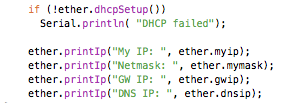
Next, you can use DHCP to obtain an IP address and locate the gateway and DNS server:

Screen Shot 2011 06 15 at 09.39.27

The printIp() utility function can optionally be used to print some info on the Serial port.

If you are going to set up a server, then a fixed IP address might be preferable. There’s a new staticSetup() function you can use when not doing DHCP:

Screen Shot 2011 06 15 at 09.42.55

The gateway IP address is only needed if you’re going to access an IP address outside of your LAN, and the DNS IP addres is also optional (it’ll default to Google’s “8.8.8.8” DNS server if you do a DNS lookup). To omit values, pass a null pointer or leave the arguments off altogether:

Screen Shot 2011 06 15 at 09.45.55

Just remember to call either dhcpSetup() or staticSetup() after the begin() call.

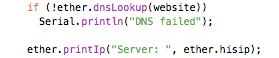
DNS lookups are also very simple:

Screen Shot 2011 06 15 at 09.47.32

The one thing to keep in mind here, is that the website argument needs to be a flash-based string, which must be defined as follows:

Screen Shot 2011 06 15 at 09.51.10

Note the “PROGMEM” modifier. See the Saving RAM space weblog post for more info about this technique.

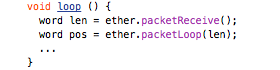
This concludes the intialization part of the EtherCard library. Next, we need to keep things going by frequently polling for new incoming packets and responding to low-level ARP and ICMP requests. The easiest way to do so is to use the following template for loop():

Screen Shot 2011 06 15 at 09.59.01

The packetReceive() function polls for new incoming data and copies it into the global buffer. The return value is the size of this packet (or zero if there is none).

The packetLoop() function looks at the incoming data and takes care of low-level responses. The return value is the offset in the global packet buffer where incoming TCP data can be found (or zero if there is none).

As to what to do next: it really all depends on what you’re after. Check out the examples in the Ethercard library for how to build web servers and web clients on top of this functionality.

To get an idea of the code overhead of the EtherCard library: a simple web client using DHCP and DNS is around 10 Kb, while an even simpler one using static IP addresses (no DHCP and no DNS) is under 7 Kb. The fairly elaborate EtherNode sample sketch, which includes DHCP and the RF12 library is now ≈ 13 Kb.

IOW, lots of room for adding your own app logic!

Source: » EtherCard library API » JeeLabs

Percona

Percona is an open source software company specializing in MySQL, MongoDB, and other open source database support, consulting, managed services, and training. The company was founded in 2006 by Peter Zaitsev and Vadim Tkachenko[1][2] and is headquartered in Raleigh, North Carolina. The company launched a MySQL backup service in June 2014 as part of its managed services.[3] The company contributes to the open source MySQL community through its blog site, the MySQL Performance blog.[4] The company also hosts annual open source database user conferences[5] named “Percona Live” in Silicon Valley and Europe. The company’s founders have also published the O’Reilly book “High Performance MySQL.”[6]

The company builds and maintains free, open-source MySQL software for Percona Server, MySQL, and MariaDB users. Percona Server is a variant of the MySQL relational database management system and is a drop-in MySQL replacement.[7] The company also produces open source software including Percona XtraDB Cluster,[8] Percona XtraBackup and Percona Toolkit.

Source: Percona – Wikipedia

10 reasons to migrate to MariaDB (if still using MySQL) – Seravo

10 reasons to migrate to MariaDB (if still using MySQL)

The original MySQL was created by a Finnish/Swedish company, MySQL AB, founded by David Axmark, Allan Larsson and Michael “Monty” Widenius. The first version of MySQL appeared in 1995. It was initially created for personal usage but in a few years evolved into a enterprise grade database and it became the worlds most popular open source relational database software – and it still is. In January 2008, Sun Microsystems bought MySQL for $1 billion. Soon after, Oracle acquired all of Sun Microsystems after getting approval from the European Commission in late 2009, which initially stopped the transaction due to concerns that such a merger would harm the database markets as MySQL was the main competitor of Oracle’s database product.

MariaDB logoOut of distrust in Oracle stewardship of MySQL, the original developers of MySQL forked it and created MariaDB in 2009. As time passed, MariaDB replaced MySQL in many places and everybody reading this article should consider it too.

At Seravo, we migrated all of our own databases from MySQL to MariaDB in late 2013 and during 2014 we also migrated our customer’s systems to use MariaDB.

We recommend everybody still using MySQL in 2015 to migrate to MariaDB for the following reasons:

1) MariaDB development is more open and vibrant

Unlike many other open source projects Oracle inherited from the Sun acquisition, Oracle does indeed still develop MySQL and to our knowledge they have even hired new competent developers after most of the original developers resigned. The next major release MySQL 5.7 will have significant improvement over MySQL 5.6. However, the commit log of 5.7 shows that all contributors are @oracle.com. Most commit messages reference issue numbers that are only in an internal tracker at Oracle and thus not open for public discussion. There are no new commits in the latest 3 months because Oracle seems to update the public code repository only in big batches post-release. This does not strike as a development effort that would benefit from the public feedback loop and the Linus law of “given enough eyes all bugs are shallow”.

MariaDB on the other hand is developed fully in the open: all development decisions can be reviewed and debated on a public mailing list of in the public bug tracker. Contributing to MariaDB with patches is easy and patch flow is transparent in the fully public and up-to-date code repository. The Github statistics forMySQL 5.7 show 24 contributors while the equivalent figure for MariaDB 10.1 is 44 contributors. But it is not just a question of code contributors – in our experience MariaDB seems more active also in documentationefforts, distribution packaging and other related things that are needed in day-to-day database administration.

Because of the big momentum MySQL has had, there is still a lot of community around it but there is a clear trend that most new activities in the open source world revolve around MariaDB.

As Linux distributions play a major role in software delivery, testing and quality assurance, the fact that the both RHEL 7 and SLES 12 ship with MariaDB instead of MySQL increases the likelihood that MariaDB is going to be better maintained both upstream and downstream in years to come.

2) Quicker and more transparent security releases

Oracle only has a policy to make security releases (and related announcements) every three months for all of their products. MySQL however has a new release every two months. Sometimes this leads situations where security upgrades and security information are not synced. Also the MySQL release notes do not list all the CVE identifiers the releases fix. Many have complained that the actual security announcements are very vague and do not identify the actual issues or the commits that fixed them, which makes it impossible to do backporting and patch management for those administrators that cannot always simply upgrade to the latest Oracle MySQL release.

MariaDB however follows good industry standards by releasing security announcements and upgrades at the same time and handling the pre-secrecy and post-transparency in a proper way. MariaDB release notes also list the CVE identifiers pedantically and they even seem to update the release notes afterwards if new CVE identifiers are created about issues that MariaDB has already released fixes for.

3) More cutting edge features

MySQL 5.7 is looking promising and it has some cool new features like GIS support. However, MariaDB has had much more new features in recent years and they are released earlier, and in most cases those features seem to go through a more extensive review before release. Therefore we at Seravo trust MariaDB to deliver us the best features and least bugs.

For example GIS features were introduced already in the 5.3 series of MariaDB, which makes storing coordinates and querying location data easy. Dynamic column support (MariaDB only) is interesting because it allows for NoSQL type functionality, and thus one single database interface can provide both SQL and “not only SQL” for diverse software project needs.

4) More storage engines

MariaDB in particular excels as the amount of storage engines and other plugins it ships with: Connect and Cassandra storage engines for NoSQL backends or rolling migrations from legacy databases, Spider for sharding, TokuDB with fractal indexes etc. These plugins are available for MySQL as well via 3rd parties, but in MariaDB they are part of the official release, which guarantees that the plugins are well integrated and easy to use.

5) Better performance

MariaDB claims it has a much improved query optimizer and many other performance related improvements. Certain benchmarks show that MariaDB is radically faster than MySQL. Benchmarks don’t however always directly translate to real life situations. For example when we at Seravo migrated from MySQL to MariaDB, we saw moderate 3-5 % performance improvements in our real-life scenarios. Still, when it all adds up, 5% is relevant in particular for web server backends, where every millisecond counts. Faster is always better, even if it is just a bit faster.

6) Galera active-active master clustering

Galera is a new kind of clustering engine which, unlike traditional MySQL master-slave replication, provides master-master replication and thus enables a new kind of scalability architecture for MySQL/MariaDB. Despite that Galera development already started in 2007, it has never been a part of the official Oracle MySQL version while both Percona and MariaDB flavors have shipped a Galera based cluster version for years.

Galera support will be even better in MariaDB 10.1, as it will be included in the main version (and not anymore in a separate cluster version) and enabling Galera clustering is just a matter of activating the correct configuration parameters in any MariaDB server installation.

7) Oracle stewardship is uncertain

Many people have expressed distrust in Oracle’s true motivations and interest in keeping MySQL alive. As explained in point 1, Oracle wasn’t initially allowed to acquire Sun Microsystems, which owned MySQL, due to the EU competition legislation. MySQL was the biggest competitor to Oracle’s original database. The European Commission however approved the deal after Oracle published an official promise to keep MySQL alive and competitive. That document included an expiry date, December 14th 2014, which has now passed. One can only guess what the Oracle upper management has in mind for the future of MySQL.

Some may argue that in recent years, Oracle has already weakened MySQL in subtle ways. Maybe, but in Oracle’s defense, it should be noted that MySQL activities have been much more successful than for example OpenOffice or Hudson, which both very quickly forked into LibreOffice and Jenkins with such a momentum, that the original projects dried up in less than a year.

However, given the choice between Oracle and a true open source project, the decision should not be hard for anybody who understands the value of software freedom and the evolutive benefits that stem from global collaborative development.

8) MariaDB has leapt in popularity

In 2013 there was news about Wikipedia migrating it’s enormous wiki system from MySQL to MariaDB and about Google using MariaDB in their internal systems instead of MySQL. One of the MariaDB Foundation sponsors is Automattic, the company behind WordPress.com. Other notable examples are booking.com andCraigslist. Fedora and OpenSUSE have had MariaDB as the default SQL database option for years. With the releases of Red Hat Enterprise Linux 7 and SUSE Enterprise Linux 12 both these vendors ship MariaDB instead of MySQL and promises to support their MariaDB versions for the lifetime of the major distribution releases, that is up to 13 years.

The last big distribution to get MariaDB was Debian (and based on it, Ubuntu). The “intent to package” bugin Debian was already filed in 2010 but it wasn’t until December 2013 that the bug finally got closed. This was thanks to Seravo staff who took care of packaging MariaDB 5.5 for Debian, from where it also got into Ubuntu 14.04. Later we have also packaged MariaDB 10.0, which will be included in the next Debian and Ubuntu releases in the first half of 2015.

9) Compatible and easy to migrate

MariaDB 5.5 is a complete drop-in-replacement for MySQL 5.5. Migrating to MariaDB is as easy as runningapt-get install mariadb-server or the equivalent command on your chosen Linux flavor (which, in 2015, is likely to include MariaDB in the official repositories).

Despite the migration being easy, we still recommend that database admins undertake their own testing and always back up their databases, just to be safe.

10) Migration might become difficult after 2015

In versions MariaDB 10.0 and MySQL 5.6 the forks have already started to diverge somewhat but most likely users can still just upgrade from 5.6 to 10.0 without problems. The compatibility between 5.7 and 10.1 in the future is unknown, so the ideal time to migrate is now while it is still hassle-free. If binary incompatibilities arise in the future, database admins can always still migrate their data by dumping it and importing it in the new database.

With the above in mind, MariaDB is clearly our preferred option.

One of our customers once expressed their interest in migrating from MySQL to MariaDB and wanted us to confirm whether MariaDB is bug-free. Tragically we had to disappoint them with a negative answer. However we did assure them that the most important things are done correctly in MariaDB making it certainly worth migrating to.

Source: 10 reasons to migrate to MariaDB (if still using MySQL) – Seravo