Source: 60T Aluminum 6mm Bore Hole Module 0.5 Motor Metal Gear Wheel with Top Screws | eBay
 Jovan Stosic
Jovan Stosic
Jovan Stosic
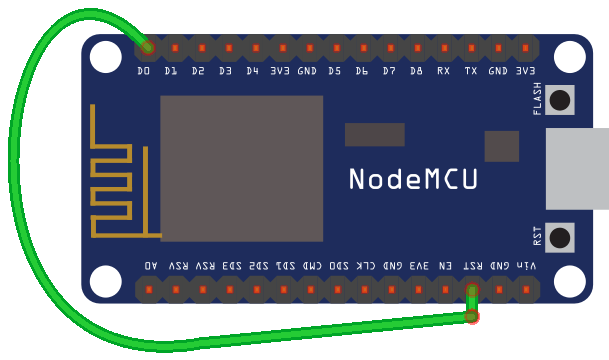
Let’s start with a simple example. You need to use a wire to connect the RST pin to GPIO 16 which is labeled as D0, in a NodeMCU board. Simply follow the next schematic:
If you take a look at the NodeMCU pinout, you can see that GPIO 16 is a special pin and it has a WAKE feature
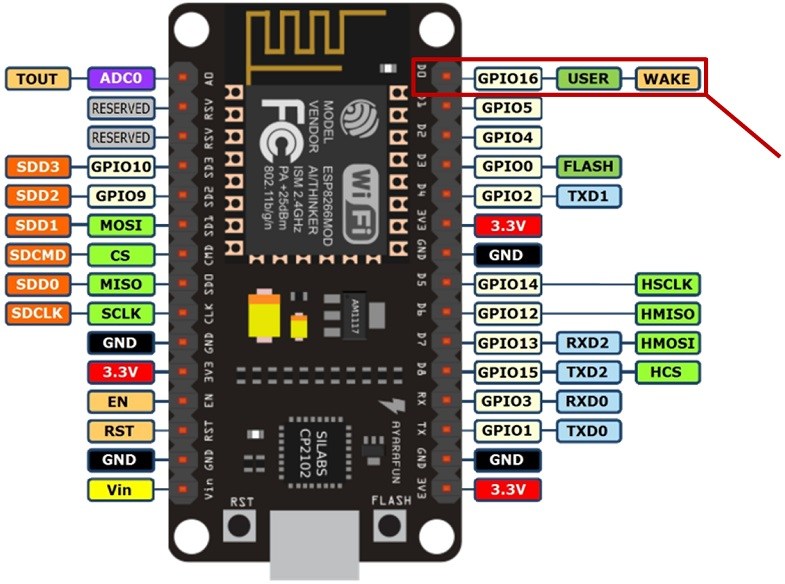
The RST pin of the ESP8266 is always HIGH while the ESP8266 is running. However, when the RST pin receives a LOW signal, it restarts the microcontroller.
If you set a Deep Sleep timer with the ESP8266, once the timer ends, GPIO 16 sends a LOW signal. That means that GPIO 16 when connected to RST pin can wake up the ESP8266 every time the timer ends.
Source: ESP8266 Deep Sleep with Arduino IDE | Random Nerd Tutorials
Jovan Stosic
If your source has a white space in the folder name then you can escape it with a \040.
e.g. in /etc/exports on your source server
/path/to/white\040space 192.168.1.27(ro,sync)
on your destination server /etc/fstab
192.168.1.15:/path/to/white\040space /my/mountpt nfs defaults 1 2
Source: [SOLVED] fstab, space in mount point/directory names?
Jovan Stosic
Jovan Stosic
Jovan Stosic
Jovan Stosic
Jovan Stosic
Changes I did:
Have the protocols in RAM
#ifdef ESP8266
// because of timing reasons we keep that in memory on esp8266
static const RCSwitch::Protocol proto[] = {
#else
static const RCSwitch::Protocol PROGMEM proto[] = {
#endif
Changes to receiveProtocol (called by ISR)
#ifdef ESP8266
bool ICACHE_RAM_ATTR RCSwitch::receiveProtocol(const int p, unsigned int changeCount) {
#else
bool RCSwitch::receiveProtocol(const int p, unsigned int changeCount) {
#endif
Source: https://github.com/sui77/rc-switch/issues/46
Jovan Stosic
Jovan Stosic