GIMP- What does “Add Alpha Channel” mean? – tutorial – YouTube
 Jovan Stosic
Jovan Stosic
Jovan Stosic
Jovan Stosic
Jovan Stosic
Jovan Stosic

Jovan Stosic
Jovan Stosic
2. Туторијал на youtube
2.1 Ако стиснеш „i“ ќе ти прикаже EXIF податоци за сликата
2.2 Exposure
– Exposure compensation е исто со зголемување на ISO. Ако го зголемиш на 1 тоа значи дека 1 stop нагоре (ако било ISO100 одиш на ISO200).
– Black и White ги сетира со користење на Tone Curve 1 (Control Cage). Белото е десно црното е лево. Гледаш на хистограмот само да ги допре y-оската за црно лево, а за бело десно.
Кривата обично изгледа приближно како буквата S. Пази ги гаси дифолтно предожените вредности за црно и бело. Не пипа контраст, lightnest ниту сатурација. Ги чепка
Highlight compression (не над 100) i Highlight Comression threshold
2.3 Whithe balance
Ова е многу важно. Ја бира пипетата и бира неутрален регион каде што имаш јако сиво или јако бело. Со тоа автоматски се мести на добра white balance. Вика понекогаш
може да го чепнеш Vibrance но не и другите параметри
2.4 Sharpening. Бира само Sharpen only edges. Инаку на небото ќе му се јави шум. Изоштрувањето го прави со промена на радиус. Обично го држи под 1 максимум 0.8.
Температурата ја чепка, ретко Tint, но не Blu/Red equalizer
2.5 Noice Reduction
– На tutorialot на youtube виика дека ако имаш големо ISO тогаш со noice reduction – Luminance треба да бидеш во опсег од 10-15 (rule of thumb). Се користи method: L*a*b
– noice reduction – Chrominance го остава на Auto. Ако избереш соодветен профил (пр. Difault ISO High или Default ISO Medium) тој ќе аплицира автоматски соодветен
noice reduction.
2.6 Save to JPG
Вика дека во избор на JPEG quality тешко можеш да видиш разлика меѓу 94 и 100%. Веројатно 94 е тамам. За Subsampling избира Balance. Вика дека тоа е добра опција.
Jovan Stosic
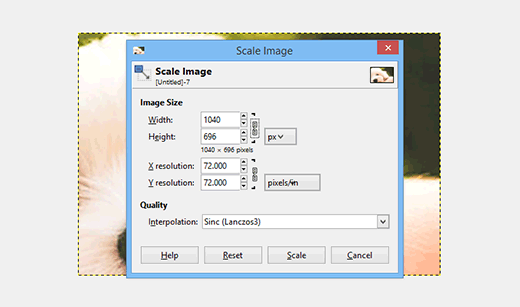
Ever wanted to enlarge an image without quality loss? Learn how to resize images to make them larger without losing quality in Photoshop and GIMP.
Source: How to Resize and Make Images Larger without Losing Quality
Jovan Stosic
Adding Shortcode to Homepage hbdevore (@hbdevore) 3 months, 3 weeks ago Hi, I need to insert this shortcode [instashow id=”1″] into my homepage to show a live feed of Instagram posts. I don’t see the option when I hit “customize” on the homepage – just a few sections like feature text boxes and testimonials. I don’t want this to be a sidebar – I want it to run across the page in one row, full-width. Can anyone help? Ps. Theme is Brasserie. Thank you! Viewing 2 replies – 1 through 2 (of 2 total) Michael (@a
Source: Topic: Adding Shortcode to Homepage « WordPress.org Forums
Jovan Stosic
Jovan Stosic
drive was 250GB not 160GB. So the numbers d
Jovan Stosic
I have a form where I display a select item and two other invisible inputs with some variable values that I need to pass to the same page at the press of the “Action” button. But I’m having the problem that those variables are city names like “New York”, so there is a space inside the name, and at the moment of passing the variable only the “New” gets passed; nothing after the space goes with it. I have read that there shouldn’t be any spaces in those variables, so how should I do this?Here is my sample code:// at the beginning of the code I get this variables pass from other pages$pais=$_GET[‘pais’]; $name=$_GET[‘nombre’];// this is how I query my table to populate my select item$SN=mysql_real_escape_string($name);$SP=mysql_real_escape_string($pais);$estadoquery = “SELECT * FROM `”.$SP.”` ORDER BY Estado ASC”;$estadoresult = mysql_query($estadoquery);// this is how I make my form<form method=”post” action=””><input type=”HIDDEN” name=nombre value=””><input type=”HIDDEN” name=pais value=””> Todos <option value=> // and this is what the button action does if(@$_POST[‘ACTION’]==’IR’){$pais = $_POST[‘pais’];$name = $_POST[‘nombre’];$estado = $_POST[‘estado’]; $pais = mysql_escape_string($pais); $name = mysql_escape_string($name); $estado = mysql_escape_string($estado);// this next echos are just to check my variables.echo $pais;echo $name;echo $estado; // so here I can tell that this variable is not complete}And I have read that variables cannot be passed with spaces, why does my $pais variable “United States” gets passed with the space in between correctly? Can someone tell me how to achieve this or how to transform my <option value=> so it can pass the space?php html sql variablesshareimprove this question edited Jul 15 ’13 at 19:27Alex Shesterov9,58072754 asked Oct 27 ’12 at 20:23zvzej2,18152136 The value of a variable can have spaces, the name cannot. For example, $pais can contain “New York”, but the the variable cannot be called $pais name. Make sense? – cale_b Oct 27 ’12 at 20:281 The problem is that you have not put quotes around the option values. Change it like so: <option value=””> and you’ll be good to go. – cale_b Oct 27 ’12 at 20:30 @cale_b this was the solution thank you! – zvzej Oct 27 ’12 at 20:43 You are very welcome. – cale_b Oct 27 ’12 at 20:44add a comment7 Answersactiveoldestvotesup vote2down voteaccepted Per my comment above:The problem is that there are not quotes around the option values. Change it like so:<option value=””> and you’ll be good to go.
Source: How to pass a variable in form using GET with spaces in PHP+HTML+SQL – Stack Overflow
Jovan Stosic