Engineering and technology

ENC28J60 losing the connection after some time.

First of all, Hello to all, my first post here.

I have an arduino uno, which I am connecting to ENC28J60 and using the ethercard library.
I have uploaded the backSoon example to the uno with a static IP 192.168.1.9

Everything works for some time (sometimes for a few minutes whereas, sometimes only for as long as 30 seconds ), but then it stops responding. The green light on ENC28J60 is on and the orange one keeps blinking, but the web page isn’t delivered.

Source: ENC28J60 losing the connection after some time.

ESP8266 – DHT11 issue

I have recently run into issues with the DHT11. It turns out that the issue is the time that a call to pinMode takes in the DHT11 library. In a small program pinMode returns as fast as 2.5-5 microseconds. In my large program it can take as long as 37 microseconds!!! This causes the code to overrun the timing at the start of the sequence when telling the DHT11 to start sending data. A call to expectPulse(LOW) finds that the line has already gone high and returns 0 immediately. The mainline code interprets this as a timeout (which also returns 0 from expectPulse()).

My initial response was to edit the code to change some of the timings but it was hard to make it correct for both the small program (fast execution) and large program (slow).

However, I recently discovered that the ESP8266 has fast instruction RAM (IRAM) and slower flash storage. I suspected that the routines are being pushed out of IRAM & consequently slowing down quite badly. So I modified the DHT.CPP to include a directive to ensure that the two timing critical routines (DHT::read and DHT::expectPulse) were both run from IRAM…

CODE: SELECT ALLboolean __attribute__((section(".iram.text"))) DHT::read(bool force) { ...
and
uint32_t __attribute__((section(".iram.text"))) DHT::expectPulse(bool level) {...

So far, no more problems! :)


Post-script to my previous post – Whilst the code above does seem to fix the problems with the DHT11, it doesn’t restore the timing of the pinMode function to the fastest that I’ve seen (2.5 microseconds). It takes it down to about 16 microseconds which is fast enough to fix the problem.

I’m not entirely sure why pinMode is so slow, except that I’m using the paho PubSub client and the slow down is definitely connected with subscribing to topics. Whether this pushes some code out of the fast memory, or if there is some interaction going on, I don’t know. But if I remove all but one subscription call – 2.5 microseconds again!!

Odd.

I have been running an ESP8266-01 with a DHT11 for several weeks continuously with no problems, using teh library with the 3rd option DHT dht(DHTPIN, DHTTYPE, 15); but not sure if that made a difference.
Now I am trying to use a DHT11 on a Wemos D1.
Did nt use the 3rd option so just DHT dht(DHTPIN, DHTTYPE);
That worked without problems till I started adding to the program, making it slightly bigger. Then most of my readings failed (someone else in this thread described that too). It is OK in the first reading after start, but then the majority fails. Adding parameter ’15’ did not make a difference. When I run the slightly smaller program again…. works like a charm, bigger one doesnt

JayEmSydney wrote:……

However, I recently discovered that the ESP8266 has fast instruction RAM (IRAM) and slower flash storage. I suspected that the routines are being pushed out of IRAM & consequently slowing down quite badly. So I modified the DHT.CPP to include a directive to ensure that the two timing critical routines (DHT::read and DHT::expectPulse) were both run from IRAM…

CODE: SELECT ALLboolean __attribute__((section(".iram.text"))) DHT::read(bool force) { ...
and
uint32_t __attribute__((section(".iram.text"))) DHT::expectPulse(bool level) {...

So far, no more problems! :)

That helped indeed a lot. Before maybe 1 out of 50 readings would NOT generate a failed to read error, and after your change about 1 out of 20 WOULD generate an error. Still not ideal, but a lot better

– See more at: http://www.esp8266.com/viewtopic.php?f=32&t=4210&p=57237#p57237

hard reset (un-plug USB on Wemos D1) reboots into configuration mode · Issue #64 · marvinroger/homie-esp8266 · GitHub

…but clicking the reset button on the D1 boots back into normal mode. Is this expected behaviour? Tried with two different D1s, same thing.

As soon as I unplug the USB cable and re-connect, the device goes back into configuration mode.

@marvinroger

Owner

This is not an expected behavior. I guess the USB is connected to a computer, can you try with a charger?
@jpmens

Contributor

@sumnerboy12 I’ve just checked for you with the Homie version I’m running (Github pull pre 1.3.0): works as advertised, i.e. I can cold-boot (also via USB) and device starts publishing.
@jpmens

Contributor

@sumnerboy12 it just occurs to me that I didn’t configure via WiFi, instead preferring to write the config directly to the file system. (Note the commented SPIFFS.format() which you might need to uncomment.)

https://gist.github.com/jpmens/d674114400c1dd7ba169403afb7d1ea1

@marvinroger

Owner

@jpmens if configuring via the API is successful, then the FS is in the exact same state as if it was written directly during flash or using your sketch, so this should not be the issue here.
@marvinroger

Owner

Can you also post the debug output on the Serial monitor? There should be a message like ✖ Cannot mount filesystem.
@dholmen

I’ve had the same problem with at least one of my NodeMCU’s. There are no error messages in the serial monitor, it just looks like a normal config mode boot.
@sumnerboy12

Yes same here – there is nothing appearing on serial when it reboots
into configuration mode. I will need to have more of a play this
evening, but it is good to know this is not expected behaviour. I will
endeavour to do some more digging and report back here.

On 15/04/2016 9:00 AM, dholmen wrote:

I’ve had the same problem with at least one of my NodeMCU’s. There are
no error messages in the serial monitor, it just looks like a normal
config mode boot.


You are receiving this because you were mentioned.
Reply to this email directly or view it on GitHub
#64 (comment)

@marvinroger

Owner

The configuration mode is started when the Config.load() method returns false. If you look at the sources, you will see that everywhere false is returned, there is a log message, I don’t see any codepath where this would not be the case. I might be wrong!
@sumnerboy12

after some debugging with @jpmens we discovered this was caused by Windows it seems – as soon as I unplug/re-plug the Wemo into my Windows laptop it resets the device back into config mode – if I flash the Wemo, un-plug and plug into a wall wart, it boots up fine. This can be repeated with no issues.

As soon as I plug the Wemo back into my Windows laptop, it is reset and reverts back to config mode.

Very odd, but I don’t think this is a Homie issue so I will close this issue.

@jpmens

Contributor

I’m confident @marvinroger knows a tonne more about these devices than we do, and can maybe say whether he’s encountered similar resets with Windows and/or whether it’s a known Windows driver issue.
@marvinroger

Owner

WeMos D1 boards embed a CH340G USB serial chip. I have a NodeMCU v2, which embeds a CP2102 chip, and I had this problem once or twice, so it is way more stable.

Maybe try to install this driver, if not already done. I am sorry, I can’t help more on this! But yes, definitely not an Homie issue.

@sumnerboy12

updating to that driver seems to have resolved it – thanks a million @marvinroger!!!
@marvinroger

Owner

Awesome! You’re welcome!
@DavidStacer

I had this problem too on a Wemos D1-mini. Updating the driver did not solve it.

To diagnose this and see all the message, I connected up another USB serial port adapter. Then connected the RX from the second serial board to the D1-mini TX pin and tied GND to the serial board. I then used Termite terminal program to monitor the serial traffic.

I changed the default Homie baud rate to 74880 – that is ESP8266 default boot baud rate. This allowed me to see the ESP8266 boot up messages too.

Now I could see all of the messages. When I pulled the main D1-mini USB cable and plugged back in, the majority of the time I would see:
• SSL: no
• OTA
• Enabled: no
Flagged for reset by pin
Device is in a resettable state
Configuration erased
↻ Rebooting in config mode

My theory:
When pinMode(this->_interface->reset.triggerPin, INPUT_PULLUP); is executed, the onboard D1-mini USB Serial adapter may not let the GPIO0 pin go high right a way. If you look on the D1-mini schematic, the RTS is connected to the GPIO0 pin via resister and NPN transistor. I’m speculating that the PC driver needs to give it a command to change (high or low don’t know which).

Placing a delay(50); after the Homie.setup() and before the Homie.loop(); seemed to solve the problem too but I didn’t like that as a solution.

Looking much deeper into the bounce code for the switch I found the default state is set to 0 meaning the switch is closed – requesting configuration mode. In Bounce::attach I changed it to be state=1; as the default.

I have cycled the D1-mini with the USB cable many times and it seems to have fixed the problem of going into configuration mode without pressing and holding the switch.

@marvinroger

Owner

@DavidStacer so what can I do at Homie’s level? There is no way to programmatically set the default value of the state in Bounce2. So changing this line to state = 1; fixes the issue for you?

Maybe I can add this in the in troubleshooting in the docs?

@DavidStacer

Changing that line did fix it for me because Bounce attach() sets the default to 0 but 1 would be a better default for this application.

When _handleReset call is made to _resetDebuncer.read() it just returns the current Bounce::read() value. The current state is still low because update() has only been called one time, so we really are not getting a debounced reading but just the initial reading.

I think its hard to fix in Homie but maybe don’t call the _resetDebuncer.read() until the DEFAULT_RESET_TIME has passed since boot up but that is just another way of delaying. I guess we are delaying the time before getting the switch value vs. holding up the rest of the program.

I will test out that idea and see if it works.

@clough42

Contributor

I was having a similar problem and came across this issue. The solution wasn’t immediately clear, so I’m summarizing to help others who also get here and are confused:

If your WeMos D1 Mini loses its configuration when you plug it into your computer with USB, it is probably erroneously detecting the RTS/DTS wiring in the WeMos as a request to reset and delete the configuration.

You can disable the reset trigger completely with Homie.disableResetTrigger() and it will stop deleting the config. If you want the reset trigger behavior, you may be able to move it to another pin. I have not attempted this.

@NikosVlagoidis

I have the same problem but only whenever i plug it on my power bank. the problem occurred after many uses of the power bank. any thoughts?
@NikosVlagoidis

actually Homie.disableResetTrigger() worked for my pc the first time but now does not work anywhere and i don’t know what to do

Source: hard reset (un-plug USB on Wemos D1) reboots into configuration mode · Issue #64 · marvinroger/homie-esp8266 · GitHub

glTF

glTF (GL Transmission Format) is a runtime asset delivery format for GL APIsWebGLOpenGL ES, and OpenGL developed by the Khronos Group 3D Formats Working Group and first announced at HTML5DevConf 2016. glTF is an efficient, interoperable asset delivery format that compresses the size of 3D scenes and models, and minimizes runtime processing by applications using WebGL and other APIs. glTF also defines a common publishing format for 3D content tools and services.
https://en.m.wikipedia.org/wiki/GlTF

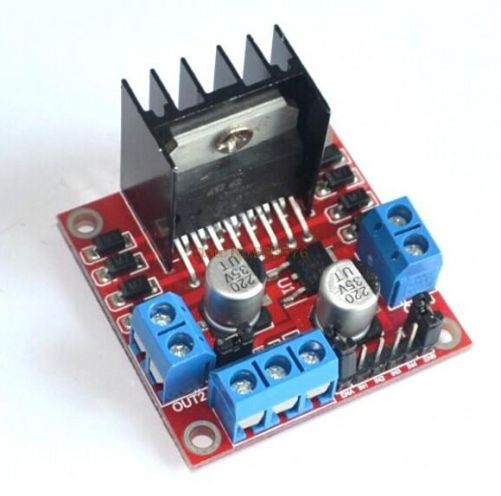
Control DC and Stepper Motors With L298N Dual Motor Controller Modules and Arduino

You don’t have to spend a lot of money to control motors with an Arduino or compatible board. After some hunting around we found a neat motor control module based on the L298N H-bridge IC that can allows you to control the speed and direction of two DC motors, or control one bipolar stepper motor with ease.The L298N H-bridge module can be used with motors that have a voltage of between 5 and 35V DC. With the module used in this tutorial, there is also an onboard 5V regulator, so if your supply voltage is up to 12V you can also source 5V from the board. So let’s get started!

Source: Control DC and Stepper Motors With L298N Dual Motor Controller Modules and Arduino

Wiznet W5100 (Ethernet Shield) Buffer Question.

So it looks like there is 8Kb of internal RX buffer on the W5100 chip… so how does one deal with reading the data faster than its coming in?  If I don’t read it fast enough or too fast what happens?   How do you flush the buffer on chip via client.flush()?  I suspect it’s FIFO.   I’m running into a situation where I am getting 8k of data posted to me and it looks like the data is being “clipped” … guess the buffer is getting filled.Looking at the W5100.c file there is mention of how the memory channels are allocated…  anyone know how it’s setup to work?  Full 8kb or less?

Source: Wiznet W5100 (Ethernet Shield) Buffer Question.

Arduino Modules – L298N Dual H-Bridge Motor Controller

Quick and simple start guide for using and exploring an L298N Dual H-Bridge Motor Controller module with an Arduino.The model in the example I am using is from Ebay. Materials needed: L298N Dual H-Bridge Motor Controller module (various models will work) Male to Female jumper wires An Arduino, any flavor. A DC power supply, 7-35vA motor that is the correct voltage for your power supply used.

Source: Arduino Modules – L298N Dual H-Bridge Motor Controller