Engineering and technology notes

5 Best Command Line Archive Tools for Linux

tar is the standard UNIX/Linux archiving application tool. In its early stage it used to be a Tape Archiving Program which gradually is developed into General Purpose archiving package which is capable of handling archive files of every kind. tar accepts a lot of archiving filter with options.

tar options

  1. -A : Append tar files to existing archives.
  2. -c : Create a new archive file.
  3. -d : Compare archive with Specified filesystem.
  4. -j : bzip the archive
  5. -r : append files to existing archives.
  6. -t : list contents of existing archives.
  7. -u : Update archive
  8. -x : Extract file from existing archive.
  9. -z : gzip the archive
  10. –delete : Delete files from existing archive.
tar Examples

Create a tar archive file.

# tar -zcvf name_of_tar.tar.gz /path/to/folder

Decompress an tar archive file.

# tar -zxvf Name_of_tar_file.tar.gz

Source: 5 Best Command Line Archive Tools for Linux – Part 1
64 bit – Does VirtualBox run 64-bit guests on a 32-bit host? – Ask Ubuntu

VirtualBox supports 64-bit guest operating systems, even on 32-bit host operating systems, provided that the following conditions are met:

  • You need a 64-bit processor with hardware virtualization support (see Section 10.3, “Hardware vs. software virtualization”).
  • You must enable hardware virtualization for the particular VM for which you want 64-bit support; software virtualization is not supported for 64-bit VMs.
  • If you want to use 64-bit guest support on a 32-bit host operating system, you must also select a 64-bit operating system for the particular VM. Since supporting 64 bits on 32-bit hosts incurs additional overhead, VirtualBox only enables this support upon explicit request.
  • On 64-bit hosts (which typically come with hardware virtualization support), 64-bit guest operating systems are always supported regardless of settings, so you can simply install a 64-bit operating system in the guest.
  • Warning

    On any host, you should enable the I/O APIC for virtual machines that you intend to use in 64-bit mode. This is especially true for 64-bit Windows VMs. See Section 3.3.2, “”Advanced” tab”. In addition, for 64-bit Windows guests, you should make sure that the VM uses the Intel networking device, since there is no 64-bit driver support for the AMD PCNet card; see Section 6.1, “Virtual networking hardware”.

Source: 64 bit – Does VirtualBox run 64-bit guests on a 32-bit host? – Ask Ubuntu

FDA Advise-ERR: Mefloquine-Not the same as Malarone! | Institute For Safe Medication Practices

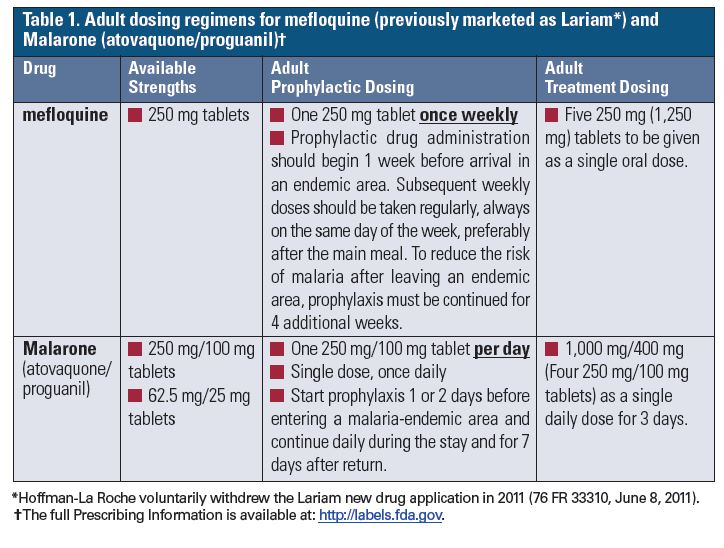
Problem: The US Food and Drug Administration (FDA) and ISMP have received reports that describe errors associated with the wrong frequency of administration with mefloquine as well as wrong drug errors in which mefloquine was dispensed instead of the intended MALARONE (atovaquone/proguanil). Both mefloquine (previously marketed as LARIAM*) and Malarone are FDA approved for use in the treatment and prophylaxis of malaria, but they each have different dosing regimens (Table 1).

Mefloquine dosing

Source: FDA Advise-ERR: Mefloquine-Not the same as Malarone! | Institute For Safe Medication Practices

software installation – How to install Viber in Ubuntu?

Viber has released its official client for Ubuntu/Linux. To install it, open your terminal with CTRL+ALT+T and type:

wget https://download.cdn.viber.com/cdn/desktop/Linux/Viber.zip

Then unzip it and cd to that viber directory. Then do as:

unzip Viber.zip
cd Viber
~/Viber/Viber.sh


How to install in .DEB way // Currently only 64-bit available

Open your terminal and type:

wget -O viber.deb https://download.cdn.viber.com/cdn/desktop/Linux/viber.deb  
sudo dpkg -i viber.deb

Source: software installation – How to install Viber in Ubuntu? – Ask Ubuntu

Moodle – Transitioning to HTTPS

On a basic Moodle site, it will be simple to set up https. Simply edit config.php and change http:// to https:// in $CFG->wwwroot.

However if you are using a proxy or load balancer, depending on your setup you may need to set $CFG->sslproxy to 1, and not use SSL on the Moodle server. Then the load balancer or proxy server can communicate directly to your Moodle site, but serve to the clients over SSL.

Source: Transitioning to HTTPS – MoodleDocs