https://www.allaboutcircuits.com/projects/communicate-with-your-arduino-through-android/
Communicate with Your Arduino Through Android
 Jovan Stosic
Jovan Stosic
Jovan Stosic
Jovan Stosic
Jovan Stosic
I thought you’d like this Pin on Pinterest… http://pin.it/mzXVVSU
Jovan Stosic
Abstract:
Like virtually all New York City apartment dwellers, I am occasionally visited by a mouse looking for a new home. However, I was still surprised to hear a familiar scratching sound emanating from behind my desk late last year. This was because 12 months previously my unusually diligent landlord and I searched for every mouse-size gap in my newly renovated apartment and blocked them all with either metal plates or steel wool. . I put down poison and traps, but they were ignored. I started an increasingly frustrated search for the mouse’s entry point, until my suspicions fell on the gap between the bottom of our apartment’s front door and the sill. It looked just large enough for a small mouse to squeeze under, but I wasn’t sure. So, naturally, I set about building my own indoor wildlife camera system to catch the pest in the act of entering. . I could have tried hooking up our Nest Wi-Fienabled security camera, and set it for night vision and motion detection, but the Nest is really designed for monitoring rooms, not small areas like my doorsill. I also wondered if I could achieve my goals without sending a stream of live video from my home to some unknown data center. . Fortunately, I’d spotted what promised to be the ideal solution during the 2016 World Maker Faire in New York City last October. Singapore-based Annikken makes a line of shields that let Arduino microcontrollers communicate with a smartphone via Bluetooth. Previously, these shields worked with either Android or iOS mobile devices, but not both. At the Faire however, Annikken was demonstrating its latest product, the US $79 Annikken Andee U-AIO, which can communicate with both types of device (and the Apple Watch as well).
Published in: IEEE Spectrum ( Volume: 54, Issue: 2, February 2017 )
Page(s): 19 – 20
Date of Publication: 31 January 2017
Print ISSN: 0018-9235
DOI: 10.1109/MSPEC.2017.7833496
Publisher: IEEE
Sponsored by: IEEE
Jovan Stosic
I posted over in the ZoneMinder forums as well but no response: I have installed ZoneMinder 1.23.3 on my Ubuntu server 9.04, everything works great. In the Options, I moved the storage location for Events from its’ default over to my RAID volume, to keep it from eating up the space on my small OS drive. It stores the events, I can see them, but I cannot play them back in the browser. The likely suspect is that it needs a link between the old path and the new one, but I need the actual syntax on
Jovan Stosic
Jovan Stosic
Try the following connection options in iSpy to connect to your Revotech IP camera. If VLC or FFMPEG options are available we recommend you try those first as they will often be faster and include audio support. If you don’t have VLC installed (or are experiencing problems with the VLC plugin) you may be able to use the same URL under the FFMPEG source type (VLC is based on FFMPEG).
The settings for Revotech cameras are built right into our open source surveillance software iSpy – click “Add” then “IP camera with wizard” to automatically setup your Revotech cameras. Start typing in the “Make” box to find your camera. If your camera is not listed in iSpy then click “Get Latest List” when on the add camera wizard. If you need to modify the URL then add or edit the Revotech camera in iSpy and you can modify the connection type and URL in the video source dialog (button is top of the first tab).
Source: Connect to Revotech IP cameras
Jovan Stosic
Jovan Stosic
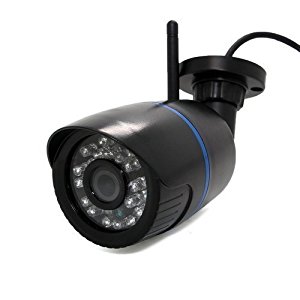
Revotech® – I6032B-W WIFI 1280 x 960P 1.3MP Bullet IP: Amazon.co.uk: Camera & Photo
Source: Revotech® – I6032B-W WIFI 1280 x 960P 1.3MP Bullet IP: Amazon.co.uk: Camera & Photo
Jovan Stosic
Jovan Stosic
The ESP8266 is a low-cost Wi-Fi chip with full TCP/IP stack and MCU (Micro Controller Unit) capability produced by Shanghai-based Chinese manufacturer, Espressif Systems.[1]
The chip first came to the attention of western makers in August 2014 with the ESP-01 module, made by a third-party manufacturer, AI-Thinker. This small module allows microcontrollers to connect to a Wi-Fi network and make simple TCP/IP connections using Hayes-style commands. However, at the time there was almost no English-language documentation on the chip and the commands it accepted.[2] The very low price and the fact that there were very few external components on the module which suggests that it could eventually be very inexpensive in volume, attracted many hackers to explore the module, chip, and the software on it, as well as to translate the Chinese documentation.[3]
The ESP8285 is an ESP8266 with 1 MB of built-in flash, allowing for single-chip devices capable of connecting to Wi-Fi.[4]
The successor to these module(s) is ESP32.
Source: ESP8266 – Wikipedia
Jovan Stosic
Jovan Stosic