Inserting, updating, and deleting data in MySQLIn this part of the MySQL tutorial, we will insert, update and delete data from MySQL tables. We will use the INSERT, DELETE and UPDATE statements. These statements are part of the SQL Data Manipulation Language, DML.
Engineering and technology notes
Restart loop after interrupt?
Does anyone know if it is possible to start a program from the beginning of the loop() function after an external interrupt has been executed instead of picking up where it left off?
I have a program which checks the speed of the car, distance traveled, average speed etc.. and when the interrupt is activated, it is supposed to toggle through the different modes. The problem I have is that if the car is standing still and the magnets are not passing the reed switch, I need to wait 6 seconds for each screen to advance. I would like to make it so that it advances instantaneously and causing the program to start from the beginning of the loop after the interrupt has been tripped would do this. If anyone knows of another solution that would work, please let me know and so I could try that.
Source: Restart loop after interrupt?
Adi Roiban – Monitor the UPS in Ubuntu with Network UPS Tools
Monitor the UPS in Ubuntu with Network UPS Tools
I just found this great project called Network UPS Tools or nut . It comes with fully loaded with tools for monitoring local UPS, remote UPS and displaying the status via a weg page. My installation is using an Must PowerAgent 1060, connected via USB.
Installing the software is easy, just use the magic words:
sudo apt-get install nut nut-cgiTo configure nut on Ubuntu I start by reading this guide by a mysterious person named Shady Pixel.
First I checked my driver suitable for my model in the Hardware Compatibility List. The model I use is not in the list, but Must is related to Mustek and all Mustek models were using blazer_usb driver. So I went for blazer_usb.
I added the following section in /etc/nut/ups.conf (you can replace must-pa-1060 with your preferred name for the UPS):
# /etc/nut/ups.conf [must-pa-1060] driver = blazer_usb port = autoI looked for the Bus and Device number together with Vendor and Product in lsusb.
I changed the permission to 666 for /dev/bus/usb/BID/DID (replace BID with your USB bus ID, and DID with device ID). To automatically set the permission for future connections I added the following udev rule:
#/etc/udev/rules.d/10-must-pa-1060.rules SYSFS{idVendor}=='0665', SYSFS{idProduct}=='5161', MODE='0666'Then I started the UPS driver via:
$ sudo upsdrvctl startIf you get some errors like the one below, check the USB device permissions:
Can't claim USB device [0665:5161]: could not detach kernel driver from interface 0: Operation not permitted Driver failed to start (exit status=1)Now that the UPS driver is started, lets monitor it and export the status via the CGI script.
You will have to configure the mode in which nut will run. Edit /etc/nut/nut.conf and add your preferred mode:
# /etc/nut/nut.conf MODE=standaloneAdd an UPS daemon user via /etc/nut/upsd.users:
# /etc/nut/upsd.users [ups_admin] password = a password here upsmon masterConfigure the monitor to connect to this daemon via /etc/nut/upsmon.conf:
# /etc/nut/upsmon.conf MONITOR must-pa-1060@localhost 1 ups_admin the_password_here masterNow you can start the nut daemon and ups monitor via nut service:
sudo service nut startTo monitor the UPS via the web CGI script I added the following line to/etc/nut/hosts.conf:
# /etc/nut/hosts.conf MONITOR must-pa-1060@localhost 'Must PowerAgent 1060'Now you can access the CGI script via:
http://HOSTNAME/cgi-bin/nut/upsstats.cgiEnjoy!
Source: Adi Roiban – Monitor the UPS in Ubuntu with Network UPS Tools
Uninterruptable Power Supply – SME Server
Modifying NUT UPS shutdown delay.
Hello All!
I’ve recently configured a new Power Shield Defender 650VA UPS on my home SME server and it is working well. I would, however, like to change the shutdown behavior of the server.
At the moment, when the UPS goes to battery, the server continues to operate until the UPS sends the “battery low” warning, at which point it auto-shuts down. I would like to change the configuration so that the server will shut down 2 minutes after receiving the “on battery” signal.
What is the best way to achieve this?
Thanks in advance.
P.S. For those Aussies who are thinking about getting one of these UPS’, I configured NUT to use the megatec_usb driver and set the port to “auto”.
HOWTO: Set Up NUT, the Network UPS Tools
Ted Felix
Note: This page is incomplete. I will remove this when I have successfully completed configuring my UPS with NUT.
The power goes out all the time here, so I decided to take a shot at setting up a UPS and having the server shutdown when the power goes out. This turned out to be pretty difficult as the “Network UPS Tools” are a bit of a pain to set up. Here are my notes so far…
UPS’s from Dell, MGE, and Eaton appear to be fully supported by NUT. Others should work, but if you can find one of those, it’s guaranteed to work.
The ubuntu package is “nut”:
$ sudo apt-get install nutNUT is very painful to configure. Follow these steps carefully. The blasterspike.it link appears to be the best.
Identify UPS and Driver
Identify UPS. lsusb works for USB connected UPS’s. In my case, I have a “Cyber Power Systems CP1500AVR USB”.
$ lsusb ... Bus 001 Device 003: ID 0764:0501 Cyber Power System, Inc. CP1500 AVR UPSCheck the NUT Hardware Compatibility List to figure out which driver will work for your UPS. For my USB UPS, the correct driver is “usbhid-ups”.
Update ups.conf and Test
Add a new section to /etc/nut/ups.conf for the ups. I picked “serverups” for the name. “ups” would probably be better for a simple setup like mine.
[serverups] driver = usbhid-ups port = auto desc = "Server UPS"- Install udev rules for usbhid-ups (see man usbhid-ups INSTALLATION) sudo cp /lib/udev/rules.d/52-nut-usbups.rules /etc/udev/rules.d/ reboot - Set up /var/run/nut per http://www.blasterspike.it/2011/03/28/how-to-install-nut-on-ubuntu-10-10-maverick-meerkat/ sudo mkdir /var/run/nut sudo chown root:nut /var/run/nut sudo chmod 770 /var/run/nut - Test the ups.conf file: sudo upsdrvctl start Normal output: Network UPS Tools - UPS driver controller 2.6.3 Network UPS Tools - Generic HID driver 0.35 (2.6.3) USB communication driver 0.31 Using subdriver: CyberPower HID 0.3upsd
- Launch upsd sudo upsd Normal output: Network UPS Tools upsd 2.6.3 listening on 127.0.0.1 port 3493 listening on ::1 port 3493 Connected to UPS [serverups]: usbhid-ups-serverups - Test the upsd with upsc sudo upsc serverups@localhost Should see values for a lot of variables.More steps…
- Continue with the blasterspike.it steps. They seem to be good. http://www.blasterspike.it/2011/03/28/how-to-install-nut-on-ubuntu-10-10-maverick-meerkat/ - upsd.users - Need to add a user id for upsmon to login. - upsmon.conf - Need to add a line to monitor the ups. - nut.conf - Set the mode. - Start it up at boot. blasterspike uses the old "service" to start this. Is upstart an option? It might be if we set it up ourselves. As it stands, initctl does not appear to know of it. See /etc/init.d/nut.Five Minutes?
- Configure it to shutdown after 5 minutes instead of when the UPS goes critical. I don't see a way to do this anywhere. Strange. What exactly is its criteria for shutting down? 10% battery left? It's a UPS data item: battery.charge: 100 (percent) battery.charge.low: 10 (percent, this is when shutdown will occur) battery.charge.warning: 20 (percent) battery.runtime: 2887 (seconds) battery.runtime.low: 300 (seconds, this is when shutdown will occur) I think you can tweak this in one of the config files. There's an override. But this doesn't seem ideal. There's no way to say that it should shutdown after 5 minutes (if it can last that long).References
How To Install NUT – Great article with all the steps.
Network UPS Tools – NUT
NUT Documentation
nut manual section 3.9 “One UPS, one computer. This is also known as “Standalone” configuration. This is the configuration that most users will use. You need at least a driver, upsd, and upsmon running.”
5.2 “Configuration files are located in /etc/nut. nut.conf(5) must be edited to be able to invoke /etc/init.d/nut”
Section 6 of the docs covers setup. Basically, the ups.conf file has to have an entry for the ups. Then it will work. (If only that were it!)
Config files for NUT: nut.conf(5), ups.conf(5), upsd.conf(5), upsd.users(5), upsmon.conf(5)
http://archive09.linux.com/feature/128099 – Not sure this is any good.
“Failed to load platform plugin “xcb” ” while launching qt5 app on linux without qt installed – Stack Overflow
I wrote application for linux which uses Qt5.But when I am trying to launch it on the linux without Qt SDK installed, the output in console is: Failed to load platform plugin “xcb”. Available
[SOLVED] error while loading shared libraries: libstdc++-libc6.2-2.so.3 – Page 2
I’m trying to run the Linux version of Return to Castle Wolfenstein, but I get the following errors: clevelandrock@Centurion:~$ wolf ./wolf.x86: error while loading shared libraries: libstdc++-libc6.2-2.so.3: cannot open shared object file: No such file or directory clevelandrock@Centurion:~$ apt-file search libstdc++-libc6.2-2.so.3 clevelandrock@Centurion:~$ uname -a Linux Centurion 2.6.32-23-generic #37-Ubuntu SMP Fri Jun 11 07:54:58 UTC 2010 i686 GNU/Linux clevelandrock@Centurion:~$
Source: [SOLVED] error while loading shared libraries: libstdc++-libc6.2-2.so.3 – Page 2
[help]Install QT4 in Ubuntu
I want to learn QT4 in Ubuntu,I have installed it in WindowsXP,but it has some problem in linux.Can’t make the program. I want to use synaptic to install the QT4,QT assistant,QT designer,can you tell me how to do.
Source: [help]Install QT4 in Ubuntu
Were must be libqt.so.2? / Newbie Corner / Arch Linux Forums
I want install waveforge and write, that need libqt.so.2.
I download from internet libqt.so.2 and do not know were paste it.
[al@myhost ~]$ ‘/home/al/tar.gz,tgz/waveforge.0.1.2/WaveForge’
/home/al/tar.gz,tgz/waveforge.0.1.2/WaveForge: error while loading shared libraries: libqt.so.2: cannot open shared object file: No such file or directory
Source: Were must be libqt.so.2? / Newbie Corner / Arch Linux Forums
OpenUPSmart
OpenUPSmart
Go NUT(s)!
12-12-2008
All units supported by OpenUPSmart should now be supported by the Network UPS Tools. If you are having issues with any of the UPS units previously supported by OpenUPSmart they will be happy to help.
OpenUPSmart should be considered retired; NUT is your best choice for robust UPS support.
About
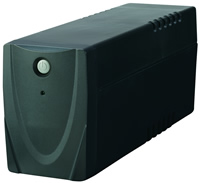
OpenUPSmart is a UNIX based daemon mainly for the no name UPS available from Dick Smith Electronics in Australia. It is listed on the website simply as “UPS Power Supply UPS0400 400VA”, but otherwise has no unique identifying features. If you know anything more about this little UPS, please contact us!
Update: Thanks to the Google cache, this appears to be called the “Micro Master” UPS, originally made by a company called Centralion.
The Protocol
At first OpenUPSmart used data gleened from sniffing the serial line with the Windows software. On later investigation the protocol appears to be based on the Megatec protocol, available here. (thanks to Chris Barnesfor relating this to the sniffed commands). Although the particular UPS pictured and originally targetted does not appear to be able to handle all of the commands.
The Software
The software is aimed as a daemon based replacement for the Commander Pro software available from www.ups-software-download.com It appears to be authored by a company called Waytech.
If your UPS uses software from this site, you should be able to replace it with OpenUPSmart. Please report any success.
The Linux software available from that site in RPM format is called UPSmart (hence OpenUPSmart).
The goal of OpenUPSmart is to communicate with the UPS, poll it periodically for status updates and run commands on event changes (power failure, power restore, etc).
The software is targetted at building and running on Linux and NetBSD but should be portable to any UNIX style operating system.
The SourceForge project page is available here.
Other confirmed working UPS devices
The BlackOut Buster 800 from PowerKinetics has been reported as working by Julian Gomez. Thanks, Julian!
The Energy Sistem UPS Smart 500 VA has been reported as working by Daniel Sanjurjo. Thanks also for the bug report Daniel!
Also, the Energy Sistem UPS Smart 800 VA has been reported as working by Paco Brufal.
The WinPower CPM-800 has been reported as working by Quoc-Huy Nguyen Dinh. He also included a photo.
The Mustek PowerMust 800 Pro has been reported as working by Alexander Ennulat. The Mustek PowerMust 600Va has been reported working by Paulo Freire.
The Micro Master 600 has been reported as working by Ed.
The Ablerex Hope Office 400/600 (apparently that is hope not home) has been reported working by Ross Marshall.
The UNITEK Alpha 500 has been reported working by Julien.
The Infosec 500XP has been reported as working by Regis Damongeot.
The IPPON Back Power Pro has been reported working by blueman.
The Neus 400va and Neus 600va have been reported working by Gonzalo Mazarrasa.
ActivePower UPS devices have been reported working by Tadeusz Milek.
The Orvaldi 600 has been reported working by Zbynek Michl.
The Phasak 400VA and 600VA UPS has been reported working by Francisco Perez. Front photo | Back photo.
Downloading
The current download version is 1.0. You can download the latest sources from the project page.
If you are having any issues, please check out the latest CVS version using the instructions below.
cvs -d:pserver:anonymous@cvs.sourceforge.net:/cvsroot/openupsmart login
cvs -z3 -d:pserver:anonymous@cvs.sourceforge.net:/cvsroot/openupsmart co openupsmart
Once you have the sources, run autogen.sh and then configure, make and make install as usual.
Bugs and patches
Bug reports or patches are happily accepted, but please try the latest CVS sources first, just incase.
If you’re sending code please create a patch using diff(1) (or use cvs with cvs diff -u). Feel free to email me if you’re unfamiliar with creating patches.
Sample Output
MRTG Output
OpenUPSmart can optionally create a thread that listens on a specified port and reports status information. This can be easily plugged into MRTG.
Here is an example of how it works
ianw@morrison:~$ /usr/pkg/sbin/nc localhost 8740 248.0 58.0 28 days, 21 hours, 46 minutes, 35 seconds OpenUPSmart
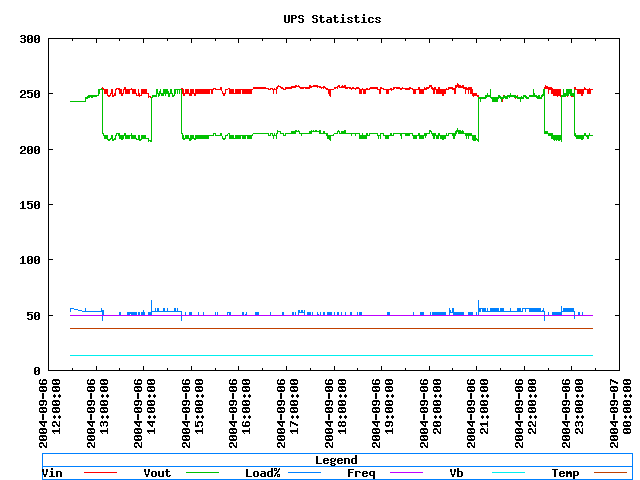
gnuplot output
Here is a little of the logging information OpenUPSmart can show via gnuplot.
Console output
You can also assign various levels of console based output which is often useful for debugging your setup.
Thu Jul 3 22:58:48 2003 openupsmartd : starting
Thu Jul 3 22:58:49 2003 init ups
Thu Jul 3 22:58:50 2003 begin polling
Thu Jul 3 22:58:51 2003 IN:227.50V, FAULT:227.00V, OUT:227.50V, LOAD:41.00%
INFREQ:49.70hz, BATT:13.40V, TEMP:37.80C, FLAGS 00001000
( FLAG_STANDBY )
Thu Jul 3 22:58:52 2003 IN:227.50V, FAULT:227.00V, OUT:227.50V, LOAD:41.00%
INFREQ:49.70hz, BATT:13.40V, TEMP:37.80C, FLAGS 00001000
( FLAG_STANDBY )
Thu Jul 3 22:58:53 2003 IN:6.00V, FAULT:69.00V, OUT:230.00V, LOAD:53.00%
INFREQ:50.00hz, BATT:13.40V, TEMP:37.80C, FLAGS 10001000
( FLAG_STANDBY FLAG_UTIL_POWER_FAIL )
Thu Jul 3 22:58:53 2003 ** Power failure **
Thu Jul 3 22:58:54 2003 IN:20.00V, FAULT:188.00V, OUT:230.00V, LOAD:53.00%
INFREQ:50.00hz, BATT:12.50V, TEMP:37.80C, FLAGS 10001000
( FLAG_STANDBY FLAG_UTIL_POWER_FAIL )
Thu Jul 3 22:58:55 2003 IN:230.00V, FAULT:230.00V, OUT:230.00V, LOAD:46.00%
INFREQ:50.00hz, BATT:11.90V, TEMP:37.80C, FLAGS 00001000
( FLAG_STANDBY )
Thu Jul 3 22:58:55 2003 ** Power restored **
Author
For any problems or queries contact Ian Wienand
Source: OpenUPSmart