Engineering and technology notes

Why is “No new release found” when upgrading from a LTS to the next? – Ask Ubuntu

I’m following the upgrade instructions on Ubuntu’s website, but on launching the upgrade tool I get this response:

Checking for a new ubuntu release
No new release found

Am I doing something wrong? Is there a workaround?

Here’s my /etc/lsb-release:

DISTRIB_ID=Ubuntu
DISTRIB_RELEASE=12.04
DISTRIB_CODENAME=precise
DISTRIB_DESCRIPTION="Ubuntu 12.04.4 LTS"
shareimprove this question
1
There’s a really good answer by Jorge Castro. Why not mark it accepted? – fluffy Jul 7 ’16 at 9:38

4 Answers

According to Ubuntu Engineering Foundations team manager Steve Langasek:

Upgrades between LTS releases are not enabled by default until the first point release, 14.04.1, scheduled for July. It is recommended that most LTS users wait until then before upgrading to 14.04.

If you choose to upgrade before then, you can pass the -d option to the upgrade tool, running do-release-upgrade -d or update-manager -d, to upgrade from vanilla 12.04 to 14.04. (-d stand for devel)

This question explains the justification for waiting for the prompt.

shareimprove this answer
6
Why, then, is do-release-upgrade (without the -d) still saying “No new release found” a few days after the .1 has been released in iso form? (My /etc/update-manager/release-upgrades says “Prompt=lts”) – tudor Aug 1 ’14 at 1:00
5
From an inspection of the code, it seems that “normal” releases default to a URLchangelogs.ubuntu.com/meta-release which lists 14.04, and LTS releases use the URLchangelogs.ubuntu.com/meta-release-lts which doesn’t list it at all. I think they haven’t updated the meta information yet. – tudor Aug 1 ’14 at 1:28
2
That seems like a release oversight, can you file a bug and CC me? email is in my profile, thanks! – Jorge Castro Aug 1 ’14 at 3:20
1
@JorgeCastro Is this indeed a release oversight, and is there any idea when it will be fixe? Was a bug filed, and where can I follow it? (I searched, but could not find it. I also want to switch from 12.04 LTS to 14.04.1 LTS, and I just want to do it through the Update Manager.) – Marnix Klooster Aug 9 ’14 at 7:12
1

If one has no access to a GUI and wants the update on terminal:

  1. Edit
    /etc/update-manager/release-upgrades
    

    to match either normal or lts. (See list below what fits your case, be aware that you can only upgrade an lts to another lts version):

    [DEFAULT]
    Prompt=normal
    
  2. Test correct version is found, run
    do-release-upgrade -c
    
  3. Upgrade in case correct version is shown:
    sudo do-release-upgrade -d
    

That way I could upgrade a 12.04 to 12.10.

For the release-upgradesPrompt option never, normal, and lts are the available options:

  • never – Never check for a new release.
  • normal – Check to see if a new release is available. If more than one new release is found, the release upgrader will attempt to upgrade to the release that immediately succeeds the currently-running release.
  • lts – Check to see if a new LTS release is available. The upgrader will attempt to upgrade to the first LTS release available after the currently-running one. Note that this option should not be used if the currently-running release is not itself an LTS release, since in that case the upgrader won’t be able to determine if a newer release is available.
shareimprove this answer
2
I had a similar issue. I simply changed from Prompt=normal to Prompt=lts and it worked just fine for me. – Florin Coada Sep 9 ’14 at 10:48

sudo do-release-upgrade -d 

Notice the -d at the end.

Source: Why is “No new release found” when upgrading from a LTS to the next? – Ask Ubuntu

Null hypothesis

In inferential statistics, the term “null hypothesis” is a general statement or default position that there is no relationship between two measured phenomena, or no association among groups.[1] Rejecting or disproving the null hypothesis—and thus concluding that there are grounds for believing that there is a relationship between two phenomena (e.g. that a potential treatment has a measurable effect)—is a central task in the modern practice of science; the field of statistics gives precise criteria for rejecting a null hypothesis.

The null hypothesis is generally assumed to be true until evidence indicates otherwise. In statistics, it is often denoted H0 (read “H-nought”, “H-null”, or “H-zero”).

The concept of a null hypothesis is used differently in two approaches to statistical inference. In the significance testing approach of Ronald Fisher, a null hypothesis is rejected if the observed data are significantly unlikely to have occurred if the null hypothesis were true. In this case the null hypothesis is rejected and an alternative hypothesis is accepted in its place. If the data are consistent with the null hypothesis, then the null hypothesis is not rejected (i.e., accepted). In neither case is the null hypothesis or its alternative proven; the null hypothesis is tested with data and a decision is made based on how likely or unlikely the data are. This is analogous to a criminal trial, in which the defendant is assumed to be innocent (null is not rejected) until proven guilty (null is rejected) beyond a reasonable doubt (to a statistically significant degree).

In the hypothesis testing approach of Jerzy Neyman and Egon Pearson, a null hypothesis is contrasted with an alternative hypothesis and the two hypotheses are distinguished on the basis of data, with certain error rates.

Proponents of each approach criticize the other approach. Nowadays, though, a hybrid approach is widely practiced and presented in textbooks. The hybrid is in turn criticized as incorrect and incoherent—for details, see Statistical hypothesis testing.

Statistical inference can be done without a null hypothesis, by specifying a statistical model corresponding to each candidate hypothesis and using model selection techniques to choose the most appropriate model.[2](The most common selection techniques are based on either Akaike information criterion or Bayes factor.

Source: Null hypothesis – Wikipedia

A/B testing

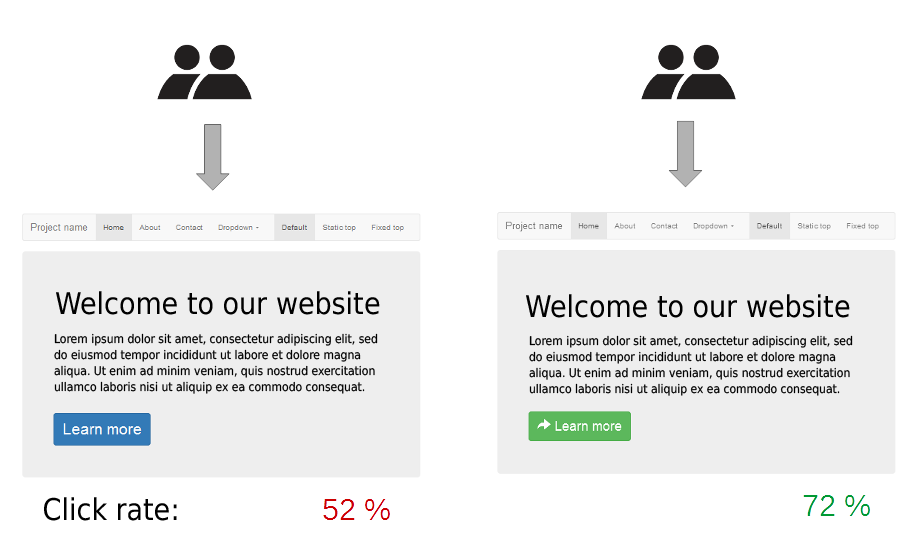
In marketing and business intelligence, A/B testing is a term for a randomized experiment with two variants, A and B, which are the control and variation in the controlled experiment.[1] A/B testing is a form of statistical hypothesis testing with two variants leading to the technical term, two-sample hypothesis testing, used in the field of statistics. Other terms used for this method include bucket tests and split-run testing. These terms can have a wider applicability to more than two variants, but the term A/B testing is also frequently used in the context of testing more than two variants. In online settings, such as web design (especially user experience design), the goal of A/B testing is to identify changes to web pages that increase or maximize an outcome of interest (e.g., click-through rate for a banner advertisement). Formally the current web page is associated with the null hypothesis. A/B testing is a way to compare two versions of a single variable typically by testing a subject’s response to variable A against variable B, and determining which of the two variables is more effective.[2]

As the name implies, two versions (A and B) are compared, which are identical except for one variation that might affect a user’s behavior. Version A might be the currently used version (control), while version B is modified in some respect (treatment). For instance, on an e-commerce website the purchase funnel is typically a good candidate for A/B testing, as even marginal improvements in drop-off rates can represent a significant gain in sales. Significant improvements can sometimes be seen through testing elements like copy text, layouts, images and colors,[3]but not always. The vastly larger group of statistics broadly referred to as multivariate testing or multinomial testing is similar to A/B testing, but may test more than two different versions at the same time and/or has more controls, etc. Simple A/B tests are not valid for observational, quasi-experimental or other non-experimental situations, as is common with survey data, offline data, and other, more complex phenomena.

A/B testing has been marketed by some as a change in philosophy and business strategy in certain niches, though the approach is identical to a between-subjects design, which is commonly used in a variety of research traditions.[4][5][6] A/B testing as a philosophy of web development brings the field into line with a broader movement toward evidence-based practice. The benefits of A/B testing are considered to be that it can be performed continuously on almost anything, especially since most marketing automation software now, typically, comes with the ability to run A/B tests on an on-going basis. This allows for updating websites and other tools, using current resources, to keep up with changing trends.

Source: A/B testing – Wikipedia

How to Solve the Common Galaxy Note 3 Problems

Samsung Galaxy Note 3 phablet currently has faced several technical issues since it has been released on September, 2013. Some Galaxy Note 3 users reported they come across the regional lock for the smartphone, while other problems like reboot loop, handwriting bug, sluggishness, Wifi disconnection and Google play also annoyed many Note 3 owners. Here we walk you through the main Galaxy Note 3 problems followed the related solutions. Hope it can help you fix the problems you met on Note 3.

Source: How to Solve the Common Galaxy Note 3 Problems

How can I mount a NFS share? – Page 2

Well, there already _is_ nfs mount code in busybox, but it was configured away, because it needs the SUN RPC library, which is missing from Android / Bionic. That issue would probably also exist for mount.nfs from other sources, which would most likely also need additional porting work. Thus, I snatched the librpc code from uClibc today, and meddled with it until it compiled in my copy of the CM9 sources. Got it to work! I can now NFS mount on my GNex, and the freshly built and installed update.zip was cop

Source: How can I mount a NFS share? – Page 2