Hackaday
 Jovan Stosic
Jovan Stosic
Jovan Stosic
Jovan Stosic
Jovan Stosic
Jovan Stosic
Jovan Stosic

In inferential statistics, the term “null hypothesis” is a general statement or default position that there is no relationship between two measured phenomena, or no association among groups.[1] Rejecting or disproving the null hypothesis—and thus concluding that there are grounds for believing that there is a relationship between two phenomena (e.g. that a potential treatment has a measurable effect)—is a central task in the modern practice of science; the field of statistics gives precise criteria for rejecting a null hypothesis.
The null hypothesis is generally assumed to be true until evidence indicates otherwise. In statistics, it is often denoted H0 (read “H-nought”, “H-null”, or “H-zero”).
The concept of a null hypothesis is used differently in two approaches to statistical inference. In the significance testing approach of Ronald Fisher, a null hypothesis is rejected if the observed data are significantly unlikely to have occurred if the null hypothesis were true. In this case the null hypothesis is rejected and an alternative hypothesis is accepted in its place. If the data are consistent with the null hypothesis, then the null hypothesis is not rejected (i.e., accepted). In neither case is the null hypothesis or its alternative proven; the null hypothesis is tested with data and a decision is made based on how likely or unlikely the data are. This is analogous to a criminal trial, in which the defendant is assumed to be innocent (null is not rejected) until proven guilty (null is rejected) beyond a reasonable doubt (to a statistically significant degree).
In the hypothesis testing approach of Jerzy Neyman and Egon Pearson, a null hypothesis is contrasted with an alternative hypothesis and the two hypotheses are distinguished on the basis of data, with certain error rates.
Proponents of each approach criticize the other approach. Nowadays, though, a hybrid approach is widely practiced and presented in textbooks. The hybrid is in turn criticized as incorrect and incoherent—for details, see Statistical hypothesis testing.
Statistical inference can be done without a null hypothesis, by specifying a statistical model corresponding to each candidate hypothesis and using model selection techniques to choose the most appropriate model.[2](The most common selection techniques are based on either Akaike information criterion or Bayes factor.
Source: Null hypothesis – Wikipedia
Jovan Stosic
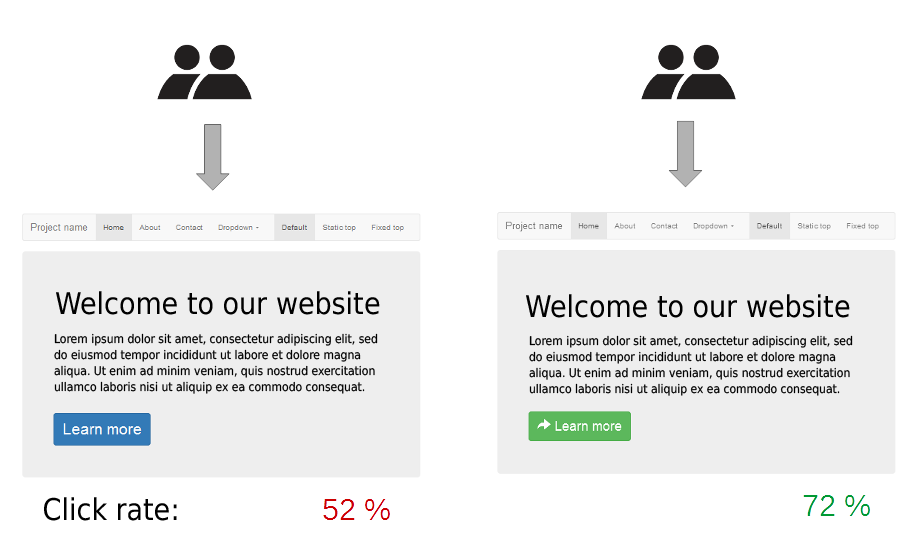
In marketing and business intelligence, A/B testing is a term for a randomized experiment with two variants, A and B, which are the control and variation in the controlled experiment.[1] A/B testing is a form of statistical hypothesis testing with two variants leading to the technical term, two-sample hypothesis testing, used in the field of statistics. Other terms used for this method include bucket tests and split-run testing. These terms can have a wider applicability to more than two variants, but the term A/B testing is also frequently used in the context of testing more than two variants. In online settings, such as web design (especially user experience design), the goal of A/B testing is to identify changes to web pages that increase or maximize an outcome of interest (e.g., click-through rate for a banner advertisement). Formally the current web page is associated with the null hypothesis. A/B testing is a way to compare two versions of a single variable typically by testing a subject’s response to variable A against variable B, and determining which of the two variables is more effective.[2]
As the name implies, two versions (A and B) are compared, which are identical except for one variation that might affect a user’s behavior. Version A might be the currently used version (control), while version B is modified in some respect (treatment). For instance, on an e-commerce website the purchase funnel is typically a good candidate for A/B testing, as even marginal improvements in drop-off rates can represent a significant gain in sales. Significant improvements can sometimes be seen through testing elements like copy text, layouts, images and colors,[3]but not always. The vastly larger group of statistics broadly referred to as multivariate testing or multinomial testing is similar to A/B testing, but may test more than two different versions at the same time and/or has more controls, etc. Simple A/B tests are not valid for observational, quasi-experimental or other non-experimental situations, as is common with survey data, offline data, and other, more complex phenomena.
A/B testing has been marketed by some as a change in philosophy and business strategy in certain niches, though the approach is identical to a between-subjects design, which is commonly used in a variety of research traditions.[4][5][6] A/B testing as a philosophy of web development brings the field into line with a broader movement toward evidence-based practice. The benefits of A/B testing are considered to be that it can be performed continuously on almost anything, especially since most marketing automation software now, typically, comes with the ability to run A/B tests on an on-going basis. This allows for updating websites and other tools, using current resources, to keep up with changing trends.
Source: A/B testing – Wikipedia
Jovan Stosic
Mario Del Monaco
Mario Del Monaco (27 July 1915 – 16 October 1982)[1] was an Italian operatic tenor who earned worldwide acclaim for his powerful voice.
Source: Mario Del Monaco – Wikipedia
Jovan Stosic

Samsung Galaxy Note 3 phablet currently has faced several technical issues since it has been released on September, 2013. Some Galaxy Note 3 users reported they come across the regional lock for the smartphone, while other problems like reboot loop, handwriting bug, sluggishness, Wifi disconnection and Google play also annoyed many Note 3 owners. Here we walk you through the main Galaxy Note 3 problems followed the related solutions. Hope it can help you fix the problems you met on Note 3.
Jovan Stosic
Jovan Stosic
Well, there already _is_ nfs mount code in busybox, but it was configured away, because it needs the SUN RPC library, which is missing from Android / Bionic. That issue would probably also exist for mount.nfs from other sources, which would most likely also need additional porting work. Thus, I snatched the librpc code from uClibc today, and meddled with it until it compiled in my copy of the CM9 sources. Got it to work! I can now NFS mount on my GNex, and the freshly built and installed update.zip was cop
Jovan Stosic
If you aren’t a fan of Evernote’s new pricing model, then it might be time to leave Evernote for another note-taking app. Learn how move your Evernote notes to OneNote and OS X Notes.
Source: Goodbye, Evernote: How to export your notes to another app – CNET
Jovan Stosic
I’ve accumulated many notes (2000+) in Evernote over the years, and love that it can store binary attachments such as images or other media files. My favorite feature is the Evernote Web Clipper browser extension; it does a fantastic job at saving the parts of an article I want to save while keeping the styling intact.
Evernote has a free plan which I’ve enjoyed for a long time, but recently the financial status of the company has come into question, and they restricted syncing to only two devices. Also, the last thing I want to happen is another kind of Google Reader shutdown fiasco. I doubt that a shutdown would make my existing notes disappear, but it’s better to be prepared ahead of time. To that extent, I’ve been looking for a viable option to migrate my notes into another platform.
Obviously it’s not in Evernote’s best interest to help people migrate away from them, but nevertheless the desktop app provides two flavors of export: one big Evernote XML file with base64 encoded attachments; or a directory of HTML files, one for each note which a correspondingly-named .resources directory holding attachments and web assets for each note.
The technologically savvy searcher can find several projects designed to ETL data from Evernote’s servers and put in into another system. If you wanted to populate a Hugo site with Evernote data, one could use enwrite. If you’re already on WordPress you could try out the Evernote Sync plugin. But with as many notes as I have, pulling the notes from the central server is slow, error-prone, and likely to hit some usage limit that Evernote enforces. The best approach for me is to use the desktop app’s export feature and then transform it into something digestible by WordPress.
Following this track, I first thought of writing a converter for the giant Enex (Evernote XML) file to make it into one or more RSS / WXR files, then using the associated native importer for WordPress. But I wasn’t sure how to keep all the base64 attachments, or if I would be able to keep the metadata I wanted. After many fits and starts, I saw the WordPress plugin HTML Import 2. This is the solution that worked for me, but there’s no free lunch, and it took me at least five tries with it to get what I wanted. In fact it says plainly in the documentation that you won’t get it right the first time. 🙂
Making it work consists of going through about 5 panes of plugin settings, transforming the Evernote HTML files a bit, and putting all the files in the right place.
Jovan Stosic
Overview Press This provides a fast and easy way to clip text, images and videos from any website and share it on your blog without ever needing to leave the site you are currently on. As you surf …
Source: Creating Quick Blog Posts with Press This – Make WordPress Support
Jovan Stosic
WordPress is an amazingly powerful CMS on its own, but if you could make it even faster and better right in your Chrome browser, wouldn’t you go for it? I would and that’s why I’ve compiled this list of the best Chrome extensions to pair with WordPress in this Weekend WordPress Project. What’s covered? I’ve sorted the lightweight and free extensions below to help you with: blogging and writing, styling and design, productivity and organization, site performance, and development. With these tools, you can get help improving your workflow and efficiency, making quick work of your tasks in WordPress.
Source: 20 Free Chrome Extensions for WordPress You Need Now – WPMU DEV
