https://discourse.osmc.tv/t/cec-not-working-samsung-tv/16050
CEC not working samsung tv
 Jovan Stosic
Jovan Stosic
Jovan Stosic
Jovan Stosic
Jovan Stosic
Jovan Stosic
Jovan Stosic
Jovan Stosic
Jovan Stosic
Jovan Stosic
Jovan Stosic
Jovan Stosic
Jovan Stosic
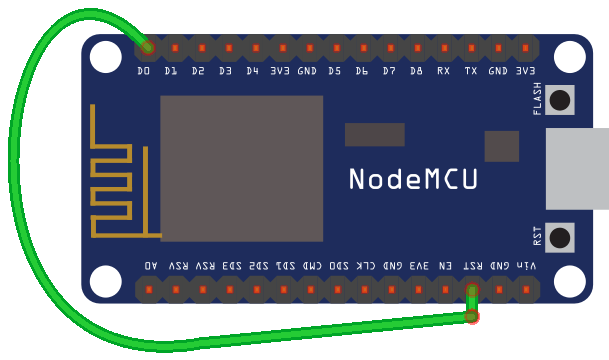
Let’s start with a simple example. You need to use a wire to connect the RST pin to GPIO 16 which is labeled as D0, in a NodeMCU board. Simply follow the next schematic:
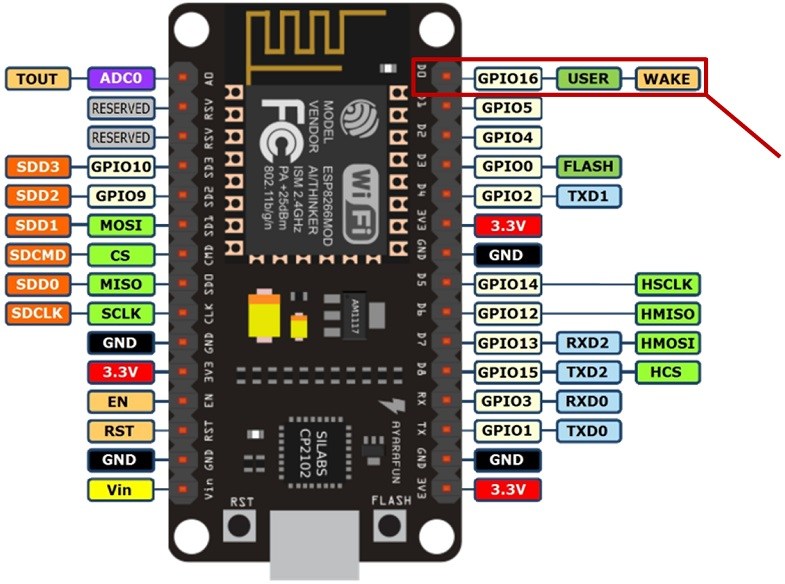
If you take a look at the NodeMCU pinout, you can see that GPIO 16 is a special pin and it has a WAKE feature
The RST pin of the ESP8266 is always HIGH while the ESP8266 is running. However, when the RST pin receives a LOW signal, it restarts the microcontroller.
If you set a Deep Sleep timer with the ESP8266, once the timer ends, GPIO 16 sends a LOW signal. That means that GPIO 16 when connected to RST pin can wake up the ESP8266 every time the timer ends.
Source: ESP8266 Deep Sleep with Arduino IDE | Random Nerd Tutorials
Jovan Stosic
If your source has a white space in the folder name then you can escape it with a \040.
e.g. in /etc/exports on your source server
/path/to/white\040space 192.168.1.27(ro,sync)
on your destination server /etc/fstab
192.168.1.15:/path/to/white\040space /my/mountpt nfs defaults 1 2
Source: [SOLVED] fstab, space in mount point/directory names?
Jovan Stosic
Jovan Stosic
Jovan Stosic
Changes I did:
Have the protocols in RAM
#ifdef ESP8266
// because of timing reasons we keep that in memory on esp8266
static const RCSwitch::Protocol proto[] = {
#else
static const RCSwitch::Protocol PROGMEM proto[] = {
#endif
Changes to receiveProtocol (called by ISR)
#ifdef ESP8266
bool ICACHE_RAM_ATTR RCSwitch::receiveProtocol(const int p, unsigned int changeCount) {
#else
bool RCSwitch::receiveProtocol(const int p, unsigned int changeCount) {
#endif
Source: https://github.com/sui77/rc-switch/issues/46
Jovan Stosic
on Issue 1: Arduino is configured with both cores already when built, so nothing else is required.
on Issue 2: Could you try to lower the flashing speed? You seem to have selected 921600 and I have seen that to fail on my mac too. Try with 115200 as a safe net and report how that goes. To note, I have had success with many baud rates with FTDI chips, but not the same with others. Silabs seems to be better than WCH, but not quite as good as FTDI.
Source: https://github.com/espressif/arduino-esp32/issues/333
Jovan Stosic